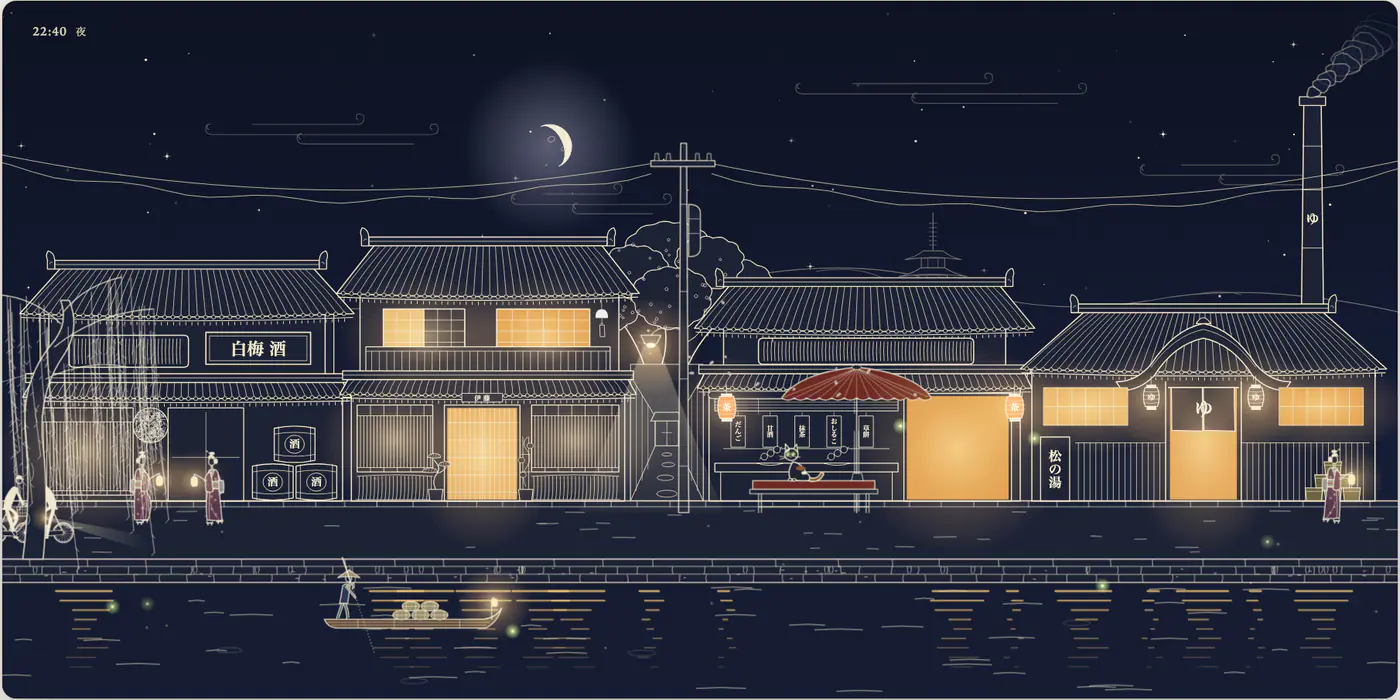
Night view of an illustrated Japanese street in pale ink, with warm lit windows and a crescent moon.
Schermate del progettoInformazioni sullo Skill
Line-art Animation is an MIT-licensed Claude skill and small TypeScript library by Dhruv Jaradi. It guides an Agent through setting a consistent pen-and-paper style, building one figure or scene corner first, solving believable walks with gait(), adding springs and pendulums for attached motion, composing interactive scenes, and checking motion frame by frame. The repository includes dependency-free modules for ink primitives, gait, motion and day-night palettes, plus walker and village examples and scripts for deterministic browser capture and reference-clip measurement.
SKILL.md
Autore: Dhruv Jaradi (JDhruv14) · JDhruv14/line-art-animation · MIT · SKILL.md @ c43d698
---
name: line-art-animation
description: Build animated line-art components in SVG and TypeScript — thin ink lines on paper, people and animals that walk, run, cycle and react, scenes with wind, lit windows and a day/night cycle, exported to video if needed. Use this whenever someone asks for a line art (or ink, pen, doodle, hand-drawn) animation, an animated illustration or scene component, little characters doing everyday things, a living street/village/shop/park, a day-night cycle illustration, "make it like this clip" for a drawn animation, or a video of such a component — even if they never say "SVG" or "line art".
---

# Line-art animation

Animated illustration components: everything is drawn with one thin pen on paper,
built live in SVG from TypeScript, so it stays crisp at any size, responds to the
pointer, and can be stepped frame by frame for checking or video export.

This skill ships a small library (`lib/`), two examples (`examples/walker`, a single
figure in ~150 lines; `examples/village`, a full scene) and tools (`scripts/`).
Read the example that's closest to the request before writing anything.

## How people judge this work

They look at it like an animator would: frame by frame, at zoom, against life or
against a reference. These were all rejected in practice, and each has a rule below:

- walks that bob on a sine wave, feet that slide, gaits sped up to fit a time-lapse
- limbs drawn as closed tubes; ruler-straight lines; rigid clothes that ignore the legs
- a whole set of components built in one go that all look alike ("AI slop")
- interactions that feel like UI instead of the world reacting
- a page whose background changes with the scene ("looks like a video, not a component")
- reusing characters from a reference clip when asked for something new
- leftover props nobody asked for (they asked to remove hanging laundry)

## Workflow

1. **Pin the look** before anything moves. Read `references/style.md`. Decide the pen
   weight, paper colour, figure proportions and the one or two flat accent colours.
2. **Set up the project.** Copy `lib/` into the project (it's four dependency-free
   `.ts` files) and use Vite + TypeScript (`package.json`, `tsconfig.json` and
   `vite.config.ts` in this repo show the setup). Components are plain DOM/SVG — no framework needed.
3. **Build one figure or one corner first** and show it (screenshot or a short clip,
   next to the reference if there is one). Get a yes before building the rest. A
   full set built at once comes back as generic; one good piece shows the bar.
4. **Make it move** with `references/motion.md`: `gait()` for walking and running,
   `spring()` / `pendulum()` for anything attached or hanging, keyed poses with
   `curve()` or `sequence()` for gestures. Never animate a figure with free sines.
5. **Compose the scene** with `references/scenes.md`: a self-contained card on a fixed
   page background, layers, a time-of-day palette from `lib/daynight.ts`, lights,
   wind, people arriving on schedules, interactions that are reactions.
6. **Verify** with `references/verify.md` before showing anything: typecheck,
   `?debug` stepping, zoomed frame strips of every moving thing, interactions
   triggered and stepped through, 60 fps in a real tab.
7. **If there's a reference clip to match**, follow `references/matching.md` — measure
   timing and poses from the clip instead of guessing, and check with an overlay.
8. **If they want a video**, follow `references/video.md` (deterministic headless
   capture with `scripts/capture.ts`, then ffmpeg).

## Rules that make it work

- **Limbs are two open strokes.** `limb()` draws a paper-filled band between two pen
  lines that stop short of each other at the far end. This is the style's signature.
- **Lines curve.** Joints are rounded, edges bow slightly, nothing is ruler-straight.
- **Draw each figure in its own space** — ~95 units tall, feet on y = 120, facing +x,
  standing at x = 40 — and place it with `place(g, x, y, dir, scale)`. Proportions,
  pen weight and the gait presets all assume this space.
- **Clothes are drawn around the skeleton.** Solve the legs (even if hidden), then
  draw the coat or kimono hem from the forward knee and the ankles so the cloth opens
  and closes with the stride. Sleeves, scarves and bags swing on springs.
- **Feet are planted.** Move a walker by exactly `gait.speed × scale` per second and
  the stance foot stays still on the ground. Don't speed a gait up to match a
  compressed clock; compress arrivals instead.
- **Ink is `currentColor`, paper is `.pp`.** Retint the whole drawing with
  `applyPalette()` (day: dark ink on warm paper; night: pale ink on indigo, warm
  windows). Solid-colour limb fills must use `solid()`, or the paper CSS wins.
- **The component is a card.** The page around it never changes colour.
- **Interactions are the world reacting**: a person bows or tips a hat, a cat wakes and
  stretches, a lantern swings, birds scatter, a fish jumps. Pointer movement is wind.
  No buttons inside the scene; a single faint hint line is enough.
- **New means new.** If the brief is "like this but new", keep the medium, pen,
  proportions and timing feel; invent the characters, activities and props.

## Library at a glance

| module | what it gives you |
|---|---|
| `lib/ink.ts` | `pen` `shape` `blot` `paint` `limb` `solid` `joint` `hang` `curve` `shoe` `place` `toScene` `inkDefs` `run` |
| `lib/gait.ts` | `gait({ kind: 'walk' \| 'shuffle' \| 'run', …overrides })` → `{ speed, period, pose(phase, go) }` |
| `lib/motion.ts` | `spring` `pendulum` `pointerWind` `sequence` `seeded` `wobble` `ease` `minJerk` … |
| `lib/daynight.ts` | `palette(τ)` → sky, paper, ink, `lamp`, `night`, `sunset`; `applyPalette` `nightTint` |

`run(draw)` drives everything with `draw(t, dt)`. Two URL flags matter for checking:
`?t=1.25` freezes time; `?debug` disables rAF and exposes `window.__step(seconds)`
for exact stepping (background and headless tabs throttle rAF, so always verify in debug mode).

## Scripts

- `scripts/capture.ts <url?debug> <outDir> <frames> <fps> [w] [h] [setupJs] [frameJs]` — deterministic PNG frames from headless Chrome
- `scripts/clip.ts period|blobs …` — loop length of a region; dark-blob tracking per frame
- `scripts/frames.sh <clip> x y w h outDir` — grid-overlaid frames for reading poses off a clip

All run with Node ≥ 22.18 (TypeScript is stripped natively) plus ffmpeg; `capture.ts`
finds a local Chrome/Chromium or uses `$CHROME`.
Perché lo abbiamo scelto
A documentation-led workflow with a small dependency-free drawing and motion library. The upstream examples show the intended visual language; output quality still depends on the agent, browser and rendering tools used.
A cosa serve
- Create a small animated SVG figure or an illustrated street, shop, park or village scene.
- Add walking, running, cycling, wind, hanging props, reactions and a day-night cycle while keeping the hand-inked style consistent.
- Capture a deterministic frame sequence for a video or measure a reference clip before matching its timing and poses.
A style-first animation workflow
Pin the visual language
Choose pen weight, warm paper, figure proportions and one or two flat accent colours before adding motion.
Build one figure or corner
Copy the dependency-free lib/ modules, make one good figure or scene corner, and inspect it before expanding the scene.
Solve motion and compose the scene
Use gait() for planted feet and believable walks or runs, spring() and pendulum() for attached motion, and the scene and day-night guidance for layers, lights and reactions.
What the included library covers
ink.ts provides SVG pen, shape, blot, limb, joint, shoe and placement helpers; gait.ts provides walk, shuffle and run presets; motion.ts provides springs, pendulums, wind and keyed sequences; daynight.ts provides a palette and night tinting. The walker and village examples demonstrate a single reactive figure and a richer scene with scheduled people, lights, reflections and pointer-driven wind.
Check motion before delivery
The upstream verification guide calls for npm run typecheck and npm run build, exact stepping with ?debug and window.__step(), zoomed frame strips for moving parts, interaction checks, a day-night sweep and a foreground frame-rate check. For video, scripts/capture.ts advances a debug page by exact frame intervals before ffmpeg encoding.
About the supplied cover
The cover is Dhruv Jaradi's upstream night scene from media/night.png. It is an author-provided example of the day-night line-art treatment, not a new output generated or tested by SkillHey.
Prima di usarlo
- The upstream workflow expects Node.js 22.18 or newer, TypeScript and Vite. Copy the repository's lib/ modules into the target project and use a browser that can run the SVG component.
- Video export uses a local Chrome or Chromium for capture and ffmpeg to encode the captured frames. These tools are not bundled by the Skill.
Fonti e riferimenti
Le fonti originali sono collegate qui sotto. Gli spunti pratici sono suggerimenti editoriali di SkillHey.