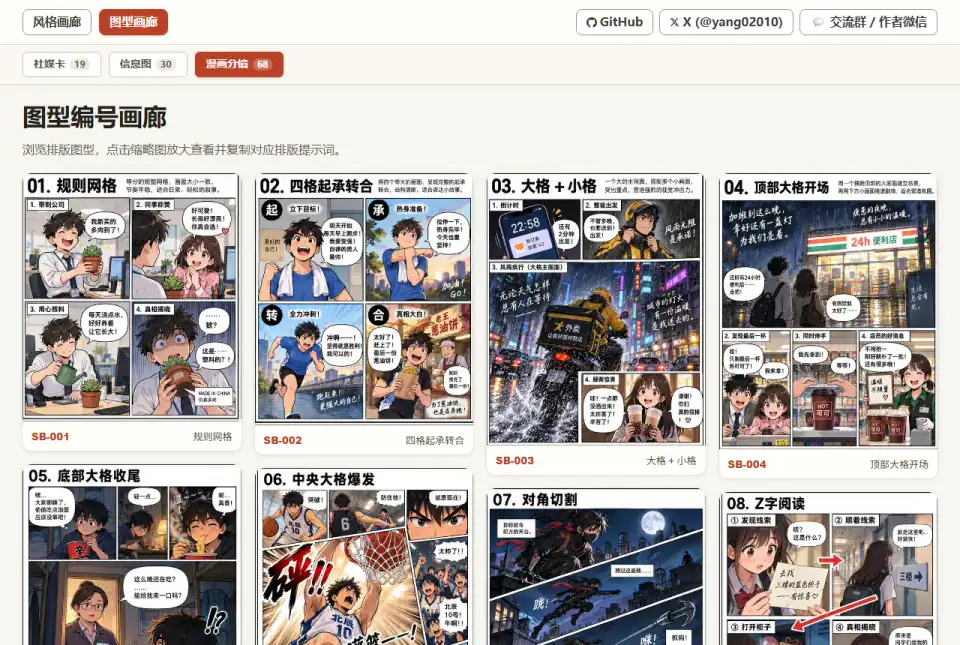
yang0's comic storyboard gallery showing grid, four-panel, large-panel and diagonal storytelling layouts.
Schermate del progettoInformazioni sullo Skill
Initialize or attach a user-selected library, add images with names and tags, replace reference images while retaining IDs, and list or remove user-owned assets. The shared Python manager refreshes the gallery after changes and separates custom assets from official presets.
SKILL.md
Autore: yang0 · yang0/handraw-style · Nessuna licenza indicata · SKILL.md @ ab848eb
---
name: custom-asset-manager
description: 管理自建图库(角色库、道具库、场景库)全生命周期资产。支持初始化与挂载图库目录、新增归档资产、替换基准图、修改名称与标签、安全删除资产、查询清单及自动刷新画廊。当用户提出“添加到角色库”、“替换IP图片”、“修改角色名称”、“删除角色/道具/场景”、“初始化图库目录”等资产维护需求时使用。
---

# 自建图库资产管理器 (Custom Asset Manager)

专为**手绘风格与排版图型库**设计的专属资产管理技能。负责管理用户自建图库(角色库、道具库、场景库)的全生命周期资产维护,包括**目录初始化与挂载**、**新增归档**、**替换基准图**、**修改属性**、**安全删除**以及**资产查询**,并确保与官方预置完全解耦、Git 更新永无冲突。

---

## 核心职责分工

| 业务意图 | 负责 Skill | 说明 |
| :--- | :--- | :--- |
| **资产维护(增/删/改/换/查)** | **`custom-asset-manager`** | 专注管理本地物理文件、多级配置与清单索引,严格维护资产状态 |
| **出图与提示词组装** | **`handdraw-style-prompter`** | 专注风格激活、图型排版拼装、垫图引用与出图设计,只读资产 |

---

## 支持的核心指令与操作规范

底层统一调用 Python 引擎:[`skills/handdraw-style-prompter/scripts/custom_library_manager.py`](../handdraw-style-prompter/scripts/custom_library_manager.py)

### 1. 初始化或挂载图库目录 (Init / Attach)
* **用户触发词**:
  * `请帮我初始化图库目录:d:\path\to\tuku`
  * `切换图库目录:d:\path\to\my_assets`
* **执行逻辑**:
  调用 `init_or_attach_library(target_path)`:
  1. 在指定目录下创建 `characters/`、`props/`、`scenes/` 及自包含的 `library.json`;
  2. 将路径持久化写入全局配置 `~/.handraw-style/config.json` 与工作区容灾配置;
  3. 若是已有目录,自动扫描现有 WebP 资产并完成无缝挂载;
  4. 触发画廊重建,生成并刷新 `skills/handdraw-style-prompter/gallery/assets.html`。

### 2. 新增归档资产 (Add / Archive)
* **用户触发词**:
  * `保存图片到角色库,名称:xxx`
  * `保存图片到道具库,名称:xxx`
  * `保存图片到场景库,名称:xxx`
  * `请添加到角色库`(未指定名称时由 AI 赋予贴切名称,并提示用户可修改)
* **执行逻辑**:
  调用 `save_asset(category, name, source_image, tags)`:
  1. 计算下一个顺序编号(角色 `CH-002...`、道具 `PR-001...`、场景 `SCN-001...`);
  2. 通过 PIL 自动转换为高质量 WebP 格式存入 `<tuku_dir>/<category>/<ID>.webp`;
  3. 同步镜像到离线预览目录 `images/custom/<category>/<ID>.webp`;
  4. 写入外部图库的 `library.json`;
  5. 自动刷新画廊。

### 3. 替换基准图 (Replace Benchmark Image)
* **用户触发词**:
  * `用这张图片替换角色 CH-002`
  * `替换 CH-002 的基准图`
  * `更新道具 PR-001 的图片`
* **执行逻辑**:
  调用 `replace_asset_image(asset_id, new_source_image)`:
  1. **保留原编号与元数据不变**;
  2. 将新图片转换为 WebP 覆盖写入 `<tuku_dir>/<category>/<ID>.webp` 与镜像缓存;
  3. 更新外部 `library.json` 的 `updated_at` 时间戳;
  4. 自动刷新画廊,出图时即刻使用全新基准图垫图。

### 4. 修改属性与标签 (Update Metadata)
* **用户触发词**:
  * `把 CH-002 名称修改为:粉扑兔`
  * `修改 CH-002 标签为:可爱, 萌系, 毛绒`
  * `将 CH-002 英文名改为:Cute Pink Bunny`
* **执行逻辑**:
  调用 `update_asset_metadata(asset_id, name=..., name_en=..., tags=...)`:
  1. 更新外部 `library.json` 中对应的资产属性;
  2. 自动刷新画廊,前端卡片即刻同步更新显示。

#### 离线图库页面中直接修改图片名称(Issue #14)

- 打开 `skills/handdraw-style-prompter/gallery/assets.html`,在**自建**角色/道具/场景卡片点击 **修改名称**;官方预置没有该按钮。
- 在弹窗中填写新名称,点击 **选择 library.json 并保存**。浏览器会请求你手动选取**当前自建图库根目录**的 `library.json`;选择不匹配的图库时会拒绝保存。
- 仅变更清单内的 `name`(默认英文名和原名一致时自动同步 `name_en`),原始编号、图片路径和 WebP 文件完全不变。保存后卡片立即更新;下次执行管理 Skill 或本地图库构建脚本时,`images/custom/custom_assets.js` 离线缓存自动刷新。
- 直接写入文件需要支持 File System Access API 的桌面浏览器(如 Chrome、Edge)及浏览器授权。**浏览器不支持时不可声称已保存**:点击 **复制 AI 修改指令**,交给使用本 Skill 的本地 AI 客户端执行即可。
- 也可以直接用本地命令行(跨平台)进行持久化修改并刷新索引:

```bash
python skills/handdraw-style-prompter/scripts/custom_library_manager.py rename CH-002 "新的图片名称"
```

- 自建图库的物理清单始终位于用户配置的外部图库目录下,绝不能把私有图库清单提交至 Git。

### 5. 安全删除资产 (Safe Delete)
* **用户触发词**:
  * `删除角色库中的 CH-002`
  * `从自建图库删除道具 PR-001`
  * `清理角色:傲娇粉团`
* **执行逻辑**:
  调用 `delete_asset(asset_id)`:
  1. **官方预置安全拦截**:若目标为官方预置(如 `CH-001` 黑猫侍者),坚决拒绝删除并告知受官方保护;
  2. 从外部图库目录物理删除对应文件;
  3. 从镜像预览目录物理删除缓存文件;
  4. 从外部 `library.json` 资产清单中移除该条目;
  5. 自动重构画廊,卡片同步从画廊消失。

### 6. 查询资产列表 (List / Inspect)
* **用户触发词**:
  * `查看我的自建角色`
  * `当前自建图库有哪些资产`
* **执行逻辑**:
  调用 `load_custom_assets()` 与 `get_asset(id)`,清晰列出当前图库目录、角色、道具与场景的数量、编号与名称。

---

## 安全守则与硬性约束

1. **官方预置神圣只读**:
   官方预置(`CH-001` 等)属于公共仓库核心资产,严禁被 `delete_asset` 或 `replace_asset_image` 篡改或删除。
2. **零路径硬编码**:
   严禁将用户的外部物理路径硬编码至 Git 追踪的代码或文档中。所有配置均经由 `~/.handraw-style/config.json` 自动寻址。
3. **操作后必定刷新画廊**:
   任何增、删、改、换操作执行后,必须确保触发画廊重构,保证前端 `assets.html` 与本地磁盘数据 100% 强一致。
4. **自建资产索引与 Git 严格隔离**:
   自建资产编号与元数据统一导出至本地 gitignored 索引文件(`images/custom/custom_assets.js`),由浏览器端动态渲染加载,绝不可烘焙进 Git 追踪的静态 HTML 文件(`assets.html` 与 `tutorials.html`)中,确保用户私有资产 100% 零泄露。
Perché lo abbiamo scelto
This workflow focuses on custom asset manager within the Handraw Style package. Its own entrypoint defines the task; retain the shared package assets and linked sibling workflows.
A cosa serve
- Maintain personal character, prop and scene libraries with image replacement, metadata updates and refreshed galleries.
What the workflow does
Initialize or attach a user-selected library, add images with names and tags, replace reference images while retaining IDs, and list or remove user-owned assets. The shared Python manager refreshes the gallery after changes and separates custom assets from official presets.
Install and invoke the workflow
Keep the full package
Ask Codex to install the official repository, keeping the root SKILL.md, images, shared scripts, references and sibling Skills together. The command below clones the source for inspection; configure it in the Agent Skills root as described by the author.
git clone https://github.com/yang0/handraw-style.gitChoose this entrypoint
Ask the agent to use skills/custom-asset-manager/SKILL.md (declared name: custom-asset-manager). Follow its linked dependencies and, for route-specific video producers, the video controller's route and plan requirements.
Upstream Skill entrypointOfficial package and installation guidePackage dependencies
A useful first request
Add this fox image to my personal character library with the name Library Fox and tags friendly, orange; show the new asset ID.
Tools, costs and shared previews
Provide a writable personal library directory and input images. Preserve the sibling handdraw-style-prompter manager and install its Python image-processing dependencies.
The repository is free under its attribution license. Agent subscriptions and external generation or voice services have separate costs. This detail page reuses the collection screenshots supplied by the user; they do not demonstrate a new run of this particular workflow.
Prima di usarlo
- Provide a writable personal library directory and input images. Preserve the sibling handdraw-style-prompter manager and install its Python image-processing dependencies.
- Install the complete Handraw Style repository and read the root entrypoint before invoking this nested workflow. Catalog entries are separate; their shared files remain one package.
Agenti supportati
Fonti e riferimenti
Le fonti originali sono collegate qui sotto. Gli spunti pratici sono suggerimenti editoriali di SkillHey.