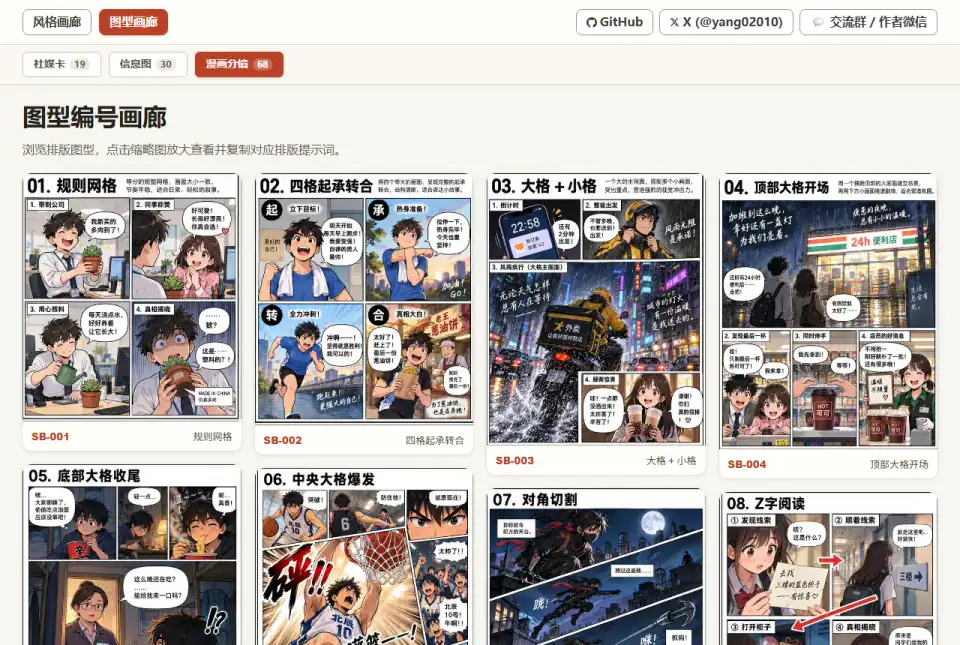
yang0's comic storyboard gallery showing grid, four-panel, large-panel and diagonal storytelling layouts.
Schermate del progettoInformazioni sullo Skill
Fetch the requested post and its available images, extract visible style traits, prepare clean reference images and contact sheets, then register the next style number. Update the reference-passing policy and rebuild and validate the library.
SKILL.md
Autore: yang0 · yang0/handraw-style · Nessuna licenza indicata · SKILL.md @ ab848eb
---
name: tweet-style-importer
description: Automatically scrape any X/Twitter tweet and its images, assign the next sequential style number, generate a 1024x1024 4-grid generation reference and a 16-grid gallery contact sheet without number badges, register the style, set mandatory image passing, and rebuild the gallery.
---

# Tweet Style Importer (推文画风自动入库 Skill)

本 Skill 用于将 X (Twitter) 上的 AI 生图风格推文(如 Midjourney `--sref` 风格、艺术家作品图集等)一键自动抓取、处理并标准化入库到手绘风格库中。

---

## 核心自动化工作流

当用户提供一个推文链接(例如 `https://x.com/.../status/...`)并要求入库时,执行以下 6 步标准流程:

```
[1. 抓取推文与高清原图]
       ↓
[2. 计算下一位顺延编号 (如 #217)]
       ↓
[3. 生成双轨图像资源]
   ├── 生图参考图:多图时为 1024×1024 四宫格;仅一张原图时直接使用单图
   ├── 风格单图:512×512 纯净风格代表图,严禁压印任何数字编号、作者Handle或角标框 (201-400/217.webp)
   └── 画廊展板:1254×1254 16 宫格画板(#201–216 使用 G;#217 起使用 H,单图以纯净画面进入展板,不压印角标)
       ↓
[4. 风格库元数据入库 (styles_200_reorganized.md)]
       ↓
[5. 模型能力策略配置 (model_capabilities.json)]
   └── 强制启用传图规则:name_activation=none, traits_activation=none
       ↓
[6. 重建画廊并运行全量校验 (build_library.py & validate_library.py)]
```

---

## 一键执行命令

在工作区直接运行自动化脚本即可完成全流程:

```powershell
# 标准一键执行
python scripts/import_tweet_style.py "https://x.com/username/status/..."

# 支持可选的自定义英文风格名与中文特征描述
python scripts/import_tweet_style.py "https://x.com/username/status/..." --name "Custom Style Name" --traits "核心特征描述"
```

---

## 各步骤规范与产出标准

### 1. 抓取推文与高清原图
- 在发起网络请求前,先按 X/Twitter 状态 ID 检查 `downloads/tweet_{id}/tweet.json`;已抓取的推文直接停止,不下载图片、不分配新编号、不改动风格库或画廊。
- 自动解析推文作者(名称与 Handle)、推文正文、Midjourney `--sref` 风格代码。
- 自动提取全部原图(强制替换为 `?name=orig` 高清尺寸)。
- 数据保存在 `downloads/tweet_{id}/`(包含 `tweet.json` 及原始图片)。
- 成功入库后写入 `import.json`,记录状态 ID、原始链接、风格编号与导入时间;重复输入时会返回已入库编号。没有 `import.json` 的历史下载仅提示“已抓取但未完成登记”,同样不会重复抓取。

### 2. 图像规格标准
- **生图出图参考图**:
  - 有 2–4 张不同原图时,创建 `images/individual/{bucket}/{number}_grid.webp`:`1024 × 1024 px` JPG 的 2×2 四宫格。
  - 仅有 1 张原图时,不创建 `_grid.webp`,直接使用 `images/individual/{bucket}/{number}.webp`,不得复制成四格相同的图片。
- **风格单图 (`images/individual/{bucket}/{number}.webp`)**:
  - 规格:`512 × 512 px` WebP
  - 细节:纯净画面,**严禁压印任何数字编号、作者Handle或角标框**,完整保留原画画面内容与构图细节。
- `{bucket}` 每 200 个编号递增:`001-200`、`201-400`、`401-600`。存在四宫格时,它与同编号单图位于同一个目录。
- **画廊展板(#217 起为 `images/H_{number}.webp`)**:
  - 规格:`1254 × 1254 px` WebP
  - 布局:标准 4×4(16 宫格)画板,按左到右、上到下续填;未满时不新建展板。
  - 命名:文件名反映已实际填入的编号范围,例如 `H_217-218.webp`;填满 16 格后,下一个编号才创建新展板。
  - 状态:`references/contact_sheet_state.json` 记录活动展板、已填数量和下一格;单图以无角标纯净画面进入对应格。

### 3. 风格库与模型策略入库
- **严禁提取推文原图的画面具体内容到特征描述 (Prohibition on Content Extraction)**:
  - 无论推文原图绘制的是什么内容(例如特定动漫角色、机甲、女孩、动物、街景、武器等),**绝对禁止**将这些具体主体、角色外貌、服饰、动作或具体场景写入 --traits!
  - --traits 只能且必须仅提取艺术媒介与渲染风格(如 3D 渲染质感、水彩晕染、胶片噪点、高饱和撞色、强轮廓光等),确保未来用户换用任何全新主题时不会被原图内容污染。
- **主风格表 (`styles_200_reorganized.md`)**:
  - 更新总数标题并追加新行:
    `| {number} · {author} | {generation_name} | {traits} |`
- **模型能力策略 (`references/model_capabilities.json`)**:
  - 为该编号追加强制传图配置:
    `"{number}": { "name_activation": "none", "traits_activation": "none" }`
  - 确保调用 `resolve_reference.py` 时无论任何模型,均判定为 `use_reference_image = True`,并优先返回多图四宫格;单图导入则返回单图路径。

### 4. 画廊与验证
- 调用 `python handdraw-style-prompter/scripts/build_library.py` 重建画廊与 JSON 索引。
- 调用 `python handdraw-style-prompter/scripts/validate_library.py` 验证全库契约,确保无断号、无图片缺失。

---

## 交付与汇报格式

执行完成后,输出以下标准化成果卡片:
1. **入库信息**:编号、作者、风格名、所属分组。
2. **画廊链接**:[`skills/handdraw-style-prompter/gallery/index.html`](../handdraw-style-prompter/gallery/index.html)。
3. **双语提示词模板**:
   - 中文:`风格名称:#{编号} · {generation_name}。主题:[主题]。参考作者/风格名称:{author}。`
   - 英文:`Style name: #{number} · {generation_name}. Theme: [Theme]. Reference author/style name: {author}.`
Perché lo abbiamo scelto
This workflow focuses on tweet style importer within the Handraw Style package. Its own entrypoint defines the task; retain the shared package assets and linked sibling workflows.
A cosa serve
- Import visual references from an X/Twitter post into the numbered style library and refresh its galleries.
What the workflow does
Fetch the requested post and its available images, extract visible style traits, prepare clean reference images and contact sheets, then register the next style number. Update the reference-passing policy and rebuild and validate the library.
Install and invoke the workflow
Keep the full package
Ask Codex to install the official repository, keeping the root SKILL.md, images, shared scripts, references and sibling Skills together. The command below clones the source for inspection; configure it in the Agent Skills root as described by the author.
git clone https://github.com/yang0/handraw-style.gitChoose this entrypoint
Ask the agent to use skills/tweet-style-importer/SKILL.md (declared name: tweet-style-importer). Follow its linked dependencies and, for route-specific video producers, the video controller's route and plan requirements.
Upstream Skill entrypointOfficial package and installation guidePackage dependencies
A useful first request
Import the visual style from this X post into my local style library, then report the new number and validation result.
Tools, costs and shared previews
Needs network access to the source post, the repository-level import script and Python image dependencies. Fetching may fail when platform access is unavailable; source imagery retains its own rights.
The repository is free under its attribution license. Agent subscriptions and external generation or voice services have separate costs. This detail page reuses the collection screenshots supplied by the user; they do not demonstrate a new run of this particular workflow.
Prima di usarlo
- Needs network access to the source post, the repository-level import script and Python image dependencies. Fetching may fail when platform access is unavailable; source imagery retains its own rights.
- Install the complete Handraw Style repository and read the root entrypoint before invoking this nested workflow. Catalog entries are separate; their shared files remain one package.
Agenti supportati
Fonti e riferimenti
Le fonti originali sono collegate qui sotto. Gli spunti pratici sono suggerimenti editoriali di SkillHey.