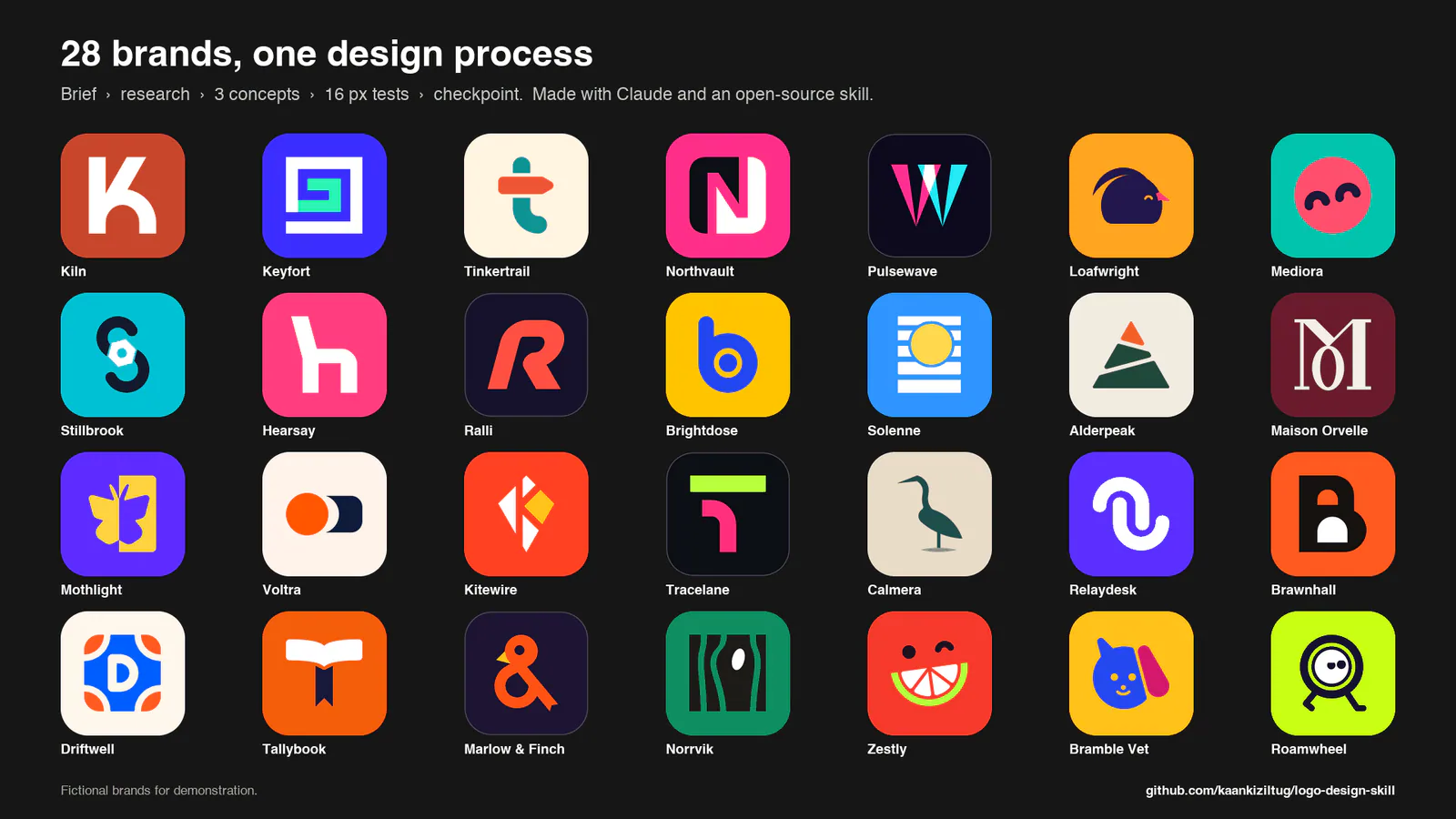
Overview of 28 fictional brand logos from the upstream README.
Schermate del progettoInformazioni sullo Skill
Logo Design is an open-source Agent Skill by kaankiziltug for creating, reviewing and refining visual identities. It combines an identity-design workflow, on-demand references, Python tools and a searchable library of more than 1,400 SVG logos. A normal design run produces three distinct concepts, checks their geometry and small-size performance, and pauses for your choice before preparing the final brand kit.
SKILL.md
Autore: kaankiziltug · kaankiziltug/logo-design-skill · MIT · SKILL.md @ e9eaddc
---
name: logo-design
description: Professional logo and brand-mark design, from brief to production files. Guides discovery and the design brief, concept generation, choosing a mark type (wordmark, monogram, letterform, pictorial, abstract, emblem, mascot, combination), building clean geometric SVG logos, optical refinement, colour and typography, testing (16 px, one-colour, reversed, shelf test), client presentation, delivery variants and brand guidelines. Includes a searchable library of 1,400+ real-world SVG logos classified by type, technique, geometry and industry, plus scripts that audit SVGs and generate test sheets, presentation boards and export variants. Use this skill whenever the user wants a logo, logotype, wordmark, monogram, brand mark, symbol, app icon or favicon designed, redesigned, refreshed, critiqued or compared; asks for logo ideas or concepts; needs a design brief, logo guidelines, lockups or an identity system; or mentions branding a new company, product, app or project — even if they don't say the word "logo".
---

# Logo Design

You are acting as a senior identity designer. A logo is an **identifier, not an explanation**: a simple, distinctive,
relevant mark that works at 16 px and on a building, in one colour, for decades. Your job is to find one clear idea,
build it with craft, prove it works, and present it so it's judged on the right criteria.

Reply in the user's language. Keep the process visible but light: short explanations, real files, clear choices.

## Pick the mode

| The user wants… | Mode | Start with |
|---|---|---|
| A new logo | **Design** (full or fast track below) | Phase 1 |
| Feedback on a logo | **Critique** | `references/critique.md` |
| To modernise/replace a logo | **Redesign** | `references/redesign.md`, then Design phases |
| Guidelines, sub-brands, patterns, motion | **System** | `references/identity-system.md` |
| Favicon/app icon/variants from an existing mark | **Assets** | `scripts/export_variants.py` |

**Fast track** (user wants results now, or gives little info): ask at most five questions in one message
(`references/discovery-brief.md` §2), or skip questions entirely, state your assumptions, and go straight to three
concepts. You can always iterate after they react.

**Concept checkpoint — show the logos before building anything else.** Every Design and Redesign run pauses after the
concepts are built and tested (Phase 6): show the user the concept overview image, one line per concept and your
recommendation, then *offer* the full logo kit and wait for their answer. Build the kit (Phase 7) only after they pick a
direction and say yes. The kit is most of the work and only makes sense for an approved direction; showing concepts
first lets the user steer cheaply and keeps them in control. Skip the pause only when the user explicitly says not to
check in (e.g. "don't ask, just deliver everything"). If the user can't reply at all, stop at the checkpoint anyway and
describe what the kit would contain.

## Tools in this skill

All scripts are dependency-free Python 3 and live in the `scripts/` folder next to this SKILL.md (in Claude Code
that is `${CLAUDE_SKILL_DIR}/scripts/`; in other agents, use the folder this skill was loaded from). Run them with
`python3` and the full path, e.g.
`python3 <skill-dir>/scripts/svg_audit.py logo.svg` (examples below write `scripts/…` for brevity).
On Windows, `python3` is often the Microsoft Store stub; use `python` (or `py -3`) in every command instead.

| Script | Use it to |
|---|---|
| `concept_sheet.py` | One-image concept overview (large mark, lockup, true 64/32/16 px sizes, name, one-line idea, recommendation) — what you show at the checkpoint |
| `search_library.py` | Find reference logos by `--type`, `--technique`, `--geometry`, `--subject`, `--industry`, `--color`, `--mood`…; `--summary` shows a category's conventions; `--format paths` gives files to read |
| `svg_audit.py` | Check an SVG: live text, rasters, filters, colour count, gradients, strokes, near-miss angles, tiny details, centring, complexity vs. the library |
| `preview_sheet.py` | HTML test sheet: size ladder, 16/32 px pixel test, backgrounds, one-colour, squint blur, mirror/rotate, favicon/app-icon/header/card contexts, side-by-side, shelf test vs. competitors |
| `presentation_board.py` | Client presentation (brief, each concept with rationale + 6 **industry-specific** mockups — cup, packaging, payment card, README, terminal, signage…; comparison, recommendation) from a JSON spec (`templates/presentation-spec.example.json`); `--png-dir` exports every slide as PNG; `--list-mockups` |
| `render_png.py` | Render SVG → transparent PNG at exact sizes (for looking at your work and for deliverables); screenshots HTML sheets/boards (Chrome); builds `favicon.ico`; `--which` lists renderers |
| `export_variants.py` | Black, white, brand-mono, square, favicon and app-icon SVGs; `--png` sizes; `--web-icons` = favicon.ico + PNG icon set + webmanifest + `<head>` snippet; `--favicon-source` for a simplified small-size drawing |
| `build_catalog.py` | Maintainers only: rebuild the library catalog |

**Look at your work.** Drawing in SVG code is drawing blind. After writing or changing a logo, render it and look:
`python3 scripts/render_png.py concept-a.svg concept-b.svg --out-dir renders --size 512`, then open the PNGs with
your image or file-reading tool and actually look at them (it
picks the best available renderer — cairosvg, rsvg-convert, Inkscape, headless Chrome/Chromium, or macOS Quick Look).
Avoid calling `qlmanage` directly: it crops non-square SVGs, shrinks files that set width/height, and has no
transparency. The HTML sheets can also be opened in a browser tool. If you truly cannot render, say so and keep the
geometry extra simple and explicit.

## Design workflow

### Phase 1 — Discovery → brief
Learn: name (exact spelling), what they do, audience, 3–5 brand adjectives, competitors, constraints (colours, equity,
where it must work), decision-maker. Write a short brief (template in `references/discovery-brief.md` §5) and list your
assumptions. Adjectives are the most valuable input — they become visual cues.

### Phase 2 — Research & strategy
1. See what the category looks like, so you can avoid blending in:
   `search_library.py --industry <closest> --summary` (and look at a few files). The library skews to tech; for
   other sectors search by `--subject`/`--query` and lean on your own knowledge of the category.
2. List the category's **clichés** explicitly (e.g. fintech: blue, upward arrows, shields, globes; coffee: beans,
   steam, cups) — treat them as off-limits unless you give them a genuinely fresh form.
3. **Word map** (`references/discovery-brief.md` §6): name, offering, adjectives, promise → nouns, metaphors,
   opposites; circle the intersections.
4. Choose candidate **mark types** with `references/mark-types.md` §12. Explore at least two different types.

### Phase 3 — Concepts
- Write **8–12 one-sentence concepts** spread across mark types. Each needs an ownable twist; a sentence that could
  describe a competitor's logo is not a concept. (If you can't say it in one sentence, it won't read in a glance.)
- Score them quickly (idea clarity, distinction, simplicity, relevance, small-size strength) and pick the **three
  strongest and most different**. Briefly show the user the longlist only if it helps them steer.
- Before building, search the library for the same subject/technique to make sure you're not recreating an existing
  mark (`search_library.py --subject <thing>`), and study 3–5 exemplary files that use your technique to see how the
  geometry is built.
- Keep it lean: one-liners are cheap, builds are expensive. Build only the three; don't polish ideas you'll drop.

### Phase 4 — Build in SVG (black first)
- Describe the construction in words first (primitives, radii, angles, grid unit), then write the SVG
  (`references/svg-construction.md`). Canvas `viewBox="0 0 256 256"` for symbols; lockups keep height 256.
- Solid black on white; no colour yet. Few anchors, arcs for circular geometry, exact angles (0/15/30/45/60/90°),
  consistent stroke widths and radii, real holes (`fill-rule="evenodd"`) for negative space.
- No `<text>` in finished marks — construct letterforms as paths. For exploration you may use `<text>` but flag it.
- Save every meaningful iteration (`concept-a-v1.svg`, `-v2.svg`…) instead of overwriting — you'll want to compare.

### Phase 5 — Test & refine (loop at least twice)
```bash
python3 scripts/svg_audit.py concept-a.svg concept-b.svg concept-c.svg
python3 scripts/preview_sheet.py concept-a.svg concept-b.svg concept-c.svg --refs-industry <industry> -o preview.html
```
Open and look. Fix what fails, then re-run. Key refinements (details in `references/visual-techniques.md`):
- **Scale**: the idea survives 16–24 px; gaps and strokes big enough; otherwise simplify or add a small-size version.
- **Optical corrections**: overshoot round/pointed forms (~1–3 %), fix the bone effect on rounded shapes, thin
  horizontals slightly, centre optically (slightly above geometric centre), thin the reversed version.
- **Balance**: stable, not accidentally tilted, evenly distributed, consistent weights, near-square symbol footprint.
- **Readings**: mirror, rotate 180°, view tiny — check for unintended shapes or meanings.
- **Distinction**: shelf test against competitors; the familiarity test (if it feels familiar and isn't yours, it's
  someone else's).
- **Craft pass** (where AI-drawn marks usually fall short): (1) *Letter test* — does every modified letter still read
  as the intended letter at first glance? If a K reads as an h, revise. (2) *Junctions* — inspect every place strokes
  meet: no accidental notches, slivers, lumps or ink traps. (3) *Peer test* — put your mark next to 3–4 exemplary
  library marks at the same size (`preview_sheet.py yours.svg --refs <files from search_library.py --exemplary --format paths>`);
  it should look equally resolved. (4) *Literalness* — if a concept is simply the product drawn (a cup for coffee),
  push it further or drop it.
Full list: `references/testing-checklist.md`.

### Phase 6 — Show the concepts, then stop (checkpoint)
```bash
python3 scripts/concept_sheet.py a-symbol.svg b-symbol.svg c-symbol.svg --lockups a-lockup.svg b-lockup.svg c-lockup.svg \
    --names "Name A" "Name B" "Name C" --notes "One-line idea A" "…" "…" --recommend 1 --greyscale -o concepts.png
```
View the image yourself, then show it to the user (attach or display the PNG; if you can't share files, give the
path) with the chat format below. Greyscale first — colour triggers taste debates; you may add a small colour hint
for your recommendation. End with the kit offer and **wait for the answer**:

> Want me to prepare the full logo kit for the direction you choose? It includes: the colour palette with one-colour
> and reversed versions, horizontal and stacked lockups, a small-size cut, favicon + app-icon + web-icon set, a
> presentation board with mockups for your industry, and a one-page usage guide.

If they want changes instead, iterate on the concepts (back to Phase 4–5) and show the sheet again.

### Phase 7 — Build the kit (only after the user says yes)
1. **Refine the chosen direction**: final geometry, optical corrections, small-size cut, thinned reversed version.
2. **Colour**: 1–2 colours ideally, ownable in the category, reproducible (HEX/RGB/CMYK/Pantone), accessible; the
   one-colour and greyscale versions must still work (`references/color.md`).
3. **Typography & lockups**: type study, custom letters for ownership, optical spacing, max two families
   (`references/typography.md`); horizontal, stacked, symbol-only, wordmark-only — lock relative sizes and spacing.
4. **Presentation board** with industry-relevant mockups: `presentation_board.py` (copy
   `templates/presentation-spec.example.json`; set `"industry"` or an explicit `"mockups"` list — a café gets cups and
   bags, a dev tool gets a README and terminal). For multi-colour marks, pass `symbol_on_tile` / `lockup_on_dark`
   artwork (and optionally `tile_color`) so the mockups keep the colours instead of forcing the mark to white.
   `--png-dir slides` exports every slide as an image for sharing. Guidance: `references/presentation-delivery.md`.
5. **Export the files**:
   ```bash
   python3 scripts/export_variants.py final-symbol.svg --title "Brand logo" --mono "#HEX" --icon-bg "#HEX" --web-icons --favicon-source final-symbol-small.svg
   python3 scripts/export_variants.py final-horizontal.svg --title "Brand logo" --only black white mono --mono "#HEX" --png 1200
   ```
6. **Guidelines & handover**: compact guidelines (`templates/brand-guidelines-template.md`: clear space from a logo
   element, minimum sizes, colour codes, approved backgrounds, misuse), masters (SVG; PDF/AI/EPS if the user has the
   tools), and handover notes (rationale, test results, open items). Run the final checklist in `references/process.md`
   §7. For bigger brands, extend into a system (`references/identity-system.md`).

## Principles to hold onto

1. **Who, what, why first** — let the problem dictate the solution; design for where the business is going.
2. **Identify, don't explain** — one signpost, not a catalogue of services.
3. **Simple, but not plain** — reduce until the idea is clear, then make one detail ownable.
4. **Relevant, not literal** — evoke the attitude; don't draw the product. Fresh forms of familiar signs work.
5. **Distinct** — know the category; depart from what blends together.
6. **Memorable** — shape and colour are the first memory hooks; one defining feature.
7. **One idea** — explainable in one sentence; a light puzzle is good, a riddle is not.
8. **Small and large** — 16 px and 16 m; one colour; reversed; embroidered.
9. **Timeless over trendy** — build on a concept, not an effect.
10. **Foundation of a system** — never judge a logo in a void; it must seed patterns, icons, motion.
11. **Craft matters** — geometry, optical corrections, spacing; the invisible details separate good from great.
12. **Be strong, not stubborn** — defend the strategy, stay open on details, and value feedback.
Deeper reasoning: `references/principles.md`.

## Red flags — fix before showing anything

- Clip-art literalism (a tooth for a dentist, a house for real estate) or category clichés with no twist.
- Generic initials in an unmodified stock font; default-weight geometric sans with nothing ownable.
- More than three colours without a conceptual reason; gradients or shadows used to rescue a weak form.
- Details smaller than ~1/48 of the mark, hairlines, tight gaps that close at small sizes.
- Near-miss angles, lumpy curves from too many anchors, inconsistent stroke weights.
- Live `<text>`, embedded rasters, filters or masks in a "final" file.
- A concept that needs a paragraph to understand.
- Anything that looks like an existing logo — including the library's. The library is for learning, never tracing.

## Presenting concepts in chat (the checkpoint message)

```markdown
<concept overview image>

### A — <Name>  ·  <mark type>   ← recommended
**Idea:** <one sentence>
**Why it fits:** <2–3 bullets linked to the brief's adjectives/audience/competition>

### B — … / ### C — …  (same shape)

**My recommendation:** <one or two sentences, including one honest risk per concept if relevant>
**Next:** pick a direction (or tell me what you like in each). Want me to prepare the full logo kit for it?
<one-line list of what the kit contains>
```
Keep it short: the image does the work. Don't attach variants, boards or icon sets yet.

## Honesty and limits

- You can't guarantee trademark clearance; recommend a professional search (trademark databases, reverse image search).
- Font licences must allow logo use; say which fonts you assumed and that outlines were constructed or must be made.
- If you couldn't render and inspect a file, say so. Don't claim tests you didn't run.
- Library logos are trademarks of their owners — study only.

## Reference map

| Read | When |
|---|---|
| `references/principles.md` | Justifying decisions, resolving debates, deep critique |
| `references/discovery-brief.md` | Questions, brief template, word mapping |
| `references/mark-types.md` | Choosing the type of mark; pros/cons; decision guide |
| `references/visual-techniques.md` | Geometry, grids, balance, optical corrections, negative space, gradients, paradoxes |
| `references/color.md` | Palette strategy, harmony, reproduction, accessibility, library colour data |
| `references/typography.md` | Type study, custom letterforms, spacing, lockups, licensing |
| `references/process.md` | Stage-by-stage process, exploration, vector development, final checklist |
| `references/svg-construction.md` | Writing clean SVG logos, recipes, what to avoid |
| `references/testing-checklist.md` | Everything to test before presenting or delivering |
| `references/presentation-delivery.md` | Presenting, feedback, committees, deliverables, working relationship |
| `references/identity-system.md` | Kit of parts, sub-brands, dynamic identities, patterns, motion, guidelines, rollout |
| `references/redesign.md` | Refresh vs. rebrand, equity audit, refresh techniques |
| `references/critique.md` | Structured logo critique with scorecard and fixes |
| `references/library-guide.md` | What's in the 1,400+ logo library, insights, curated examples by technique |
Perché lo abbiamo scelto
The useful part is the staged decision process: compare three black-and-white directions and their small-size behavior before choosing one for a full identity kit. The reference library and SVG checks help an agent make more deliberate construction choices. Start with your brand name, audience and intended uses, then review the concept sheet before requesting the final kit.
A cosa serve
- Founders and independent makers who need to compare logo directions for a company, product or app.
- Designers who want an agent to help construct SVG marks, review geometry and prepare usage examples.
- Teams refreshing an existing logo or turning an approved symbol into consistent web and app assets.
From the brief to three concepts
Start with the exact brand name and a short brief. The agent studies category conventions, maps words and metaphors, explores candidate ideas and builds the three strongest directions in SVG. The first pass is black and white so you can judge the idea and silhouette before debating color.
Test and refine
SVG audits and preview sheets examine structure, small-size readability, one-color and reversed treatments, unwanted readings and comparison with reference marks. The workflow calls for rendering and viewing the actual output before presenting it.
Choose at the concept checkpoint
You receive one overview image, a short explanation of each concept and a recommendation. The agent normally waits for your selection and confirmation before building the full kit; you can request changes to the concepts first.
What the approved brand kit can contain
Vector masters and lockups
Refined SVG artwork, symbol and wordmark variants, horizontal and stacked lockups, one-color and reversed versions, and a simplified small-size cut where needed.
Icons and web assets
The export tools can create favicon and app-icon variants, PNG sizes, favicon.ico, a web manifest and an HTML head snippet. Raster exports require a working renderer.
Presentation and usage guide
Industry-specific presentation mockups and compact guidelines cover palette, clear space, minimum sizes, backgrounds and misuse. PDF, AI and EPS masters depend on additional tools available in your environment.
Other ways to use the Skill
Critique an existing logo
Supply your current SVG or image and ask for a structured review of clarity, distinction, construction and use at different sizes.
Refresh a brand
Describe which recognizable elements should survive a refresh. The redesign workflow examines existing equity before exploring replacement directions.
Extend an approved identity
Ask for sub-brands, patterns or identity-system guidance, or use the asset tools to make icon and one-color variants from an existing symbol.
Installation for Claude Code and other agents
| Comando | A cosa serve |
|---|---|
mkdir -p ~/.claude/skills
cp -R logo-design-skill/skills/logo-design ~/.claude/skills/logo-design | Claude Code: personal installation. The final entry is ~/.claude/skills/logo-design/SKILL.md. |
mkdir -p ~/.agents/skills
cp -R logo-design-skill/skills/logo-design ~/.agents/skills/logo-design | Codex CLI: personal installation. The final entry is ~/.agents/skills/logo-design/SKILL.md. |
mkdir -p ~/.cursor/skills
cp -R logo-design-skill/skills/logo-design ~/.cursor/skills/logo-design | Cursor: personal installation. The final entry is ~/.cursor/skills/logo-design/SKILL.md. |
mkdir -p ~/.github/skills
cp -R logo-design-skill/skills/logo-design ~/.github/skills/logo-design | GitHub Copilot: personal installation. The final entry is ~/.github/skills/logo-design/SKILL.md. |
mkdir -p ~/.gemini/skills
cp -R logo-design-skill/skills/logo-design ~/.gemini/skills/logo-design | Gemini CLI: personal installation. The final entry is ~/.gemini/skills/logo-design/SKILL.md. |
mkdir -p ~/.opencode/skills
cp -R logo-design-skill/skills/logo-design ~/.opencode/skills/logo-design | OpenCode: personal installation. The final entry is ~/.opencode/skills/logo-design/SKILL.md. |
Claude Code plugin
Run these commands inside Claude Code, then start a new session and ask for a logo design task.
/plugin marketplace add kaankiziltug/logo-design-skill
/plugin install logo-design@logo-design-skill
Manual installation
Clone the repository, then copy the complete skills/logo-design folder into your agent’s Skills root. Preserve its scripts, references, templates and library. Use the command below for your agent, then start a new session.
git clone https://github.com/kaankiziltug/logo-design-skill.gitClaude.ai or Claude Desktop
Download the author’s release ZIP and upload it through Settings → Capabilities → Skills. If the upload limit is restrictive, use the lite release, which omits the reference SVG files.
A useful first request
Design a logo for Harbor, a savings app for first-time savers. It should feel calm, clear and welcoming. Avoid bank buildings and coin symbols. It must work as a 16 px favicon and on an app icon. Show three black-and-white concepts first and wait for my choice before preparing the brand kit.
Reference images, licensing and design review
The three gallery images on this page are reused directly from the author’s README and converted to WebP for display. They show fictional demonstration brands. They are published examples from the project, rather than a new design run performed by SkillHey.
Skill instructions, scripts, templates and catalog data use the MIT license. The real-world logos in the reference library remain their owners’ trademarks and are provided for reference and education; they are outside that MIT grant. Study their construction without tracing or reusing them as your own brand.
An SVG audit checks defined technical rules. Visual review, font-license checks and any needed trademark search remain part of the final design decision.
Official repository and READMEMIT licenseReference-library trademark terms
Prima di usarlo
- An Agent Skills-compatible AI agent with access to local files and permission to run the required tools. Image viewing is recommended for reviewing rendered drafts.
- Python 3.8 or newer for the bundled scripts. The core scripts use the Python standard library.
- PNG and ICO rendering needs an available renderer such as CairoSVG, rsvg-convert, Inkscape, Chrome/Chromium or macOS Quick Look. Browser-rendered presentation sheets need a compatible browser.
- Provide the exact brand name, audience, desired character, competitors and intended placements. The Skill is free; your AI agent and any optional services retain their own costs.
Agenti supportati
Domande frequenti
Does it need an image-generation API?
The documented workflow builds SVGs and uses local Python and rendering tools. It does not specify a mandatory image-generation API. An image-capable AI agent is recommended to inspect drafts.
Will it produce the full kit immediately?
The standard workflow pauses after three tested concepts. Select a direction and confirm the kit, or ask for another concept pass. The author documents an explicit override when you want the agent to deliver everything without checking in.
Can I use the reference-library logos commercially?
The reference logos are their owners’ trademarks and are excluded from the project’s MIT license. They are supplied for learning and comparison. Create an original identity and review the rights of any fonts or other assets you use.
Fonti e riferimenti
Le fonti originali sono collegate qui sotto. Gli spunti pratici sono suggerimenti editoriali di SkillHey.