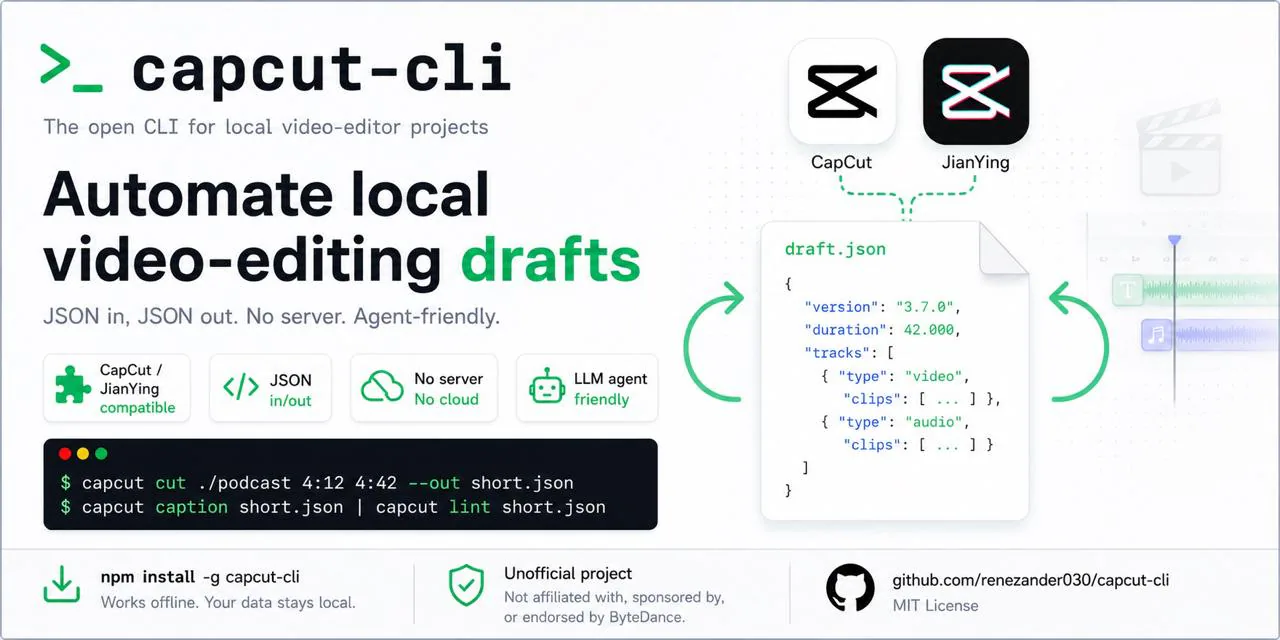
CapCut and JianYing CLI Skill — official illustration from the upstream README
Schermate del progettoInformazioni sullo Skill
Edit CapCut or JianYing project files through scripts for subtitles, timing, speed, volume, templates, animations, and short-form cuts.
SKILL.md
Autore: René Zander · renezander030/capcut-cli · MIT · SKILL.md @ 0c93e8f
---
name: capcut-edit
description: Edit CapCut / JianYing video projects — read and write subtitles, timing, speed, volume, templates, animations (fade/ken-burns), and cut long-form to shorts. Use when the user mentions capcut, jianying, subtitles, video editing, draft_content.json, draft_info.json, or cutting videos — in English or Chinese (剪映, 字幕, 草稿, 剪辑, 切片, 视频编辑).
---

# capcut-edit

CLI for editing CapCut / JianYing drafts through a version-aware store. v0.11 detects and synchronizes readable timelines across `draft_content.json`, `draft_info.json`, `draft_meta_info.json`, and `template-2.tmp`.

## Project locations

- **macOS**: `~/Movies/CapCut/User Data/Projects/com.lveditor.draft/<project>/`
- **Windows**: `%LOCALAPPDATA%\CapCut\User Data\Projects\com.lveditor.draft\<project>\`
- **Windows (JianYing / 剪映)**: `%LOCALAPPDATA%\JianyingPro\User Data\Projects\com.lveditor.draft\<project>\`

## Core principle — deterministic scripts

Any recipe involving more than one `capcut` call, any arithmetic, or any branching ships as a parameterised shell script in `scripts/`. Claude invokes the script with inputs; the script runs a fixed sequence. If a recipe can be a script, it **must** be a script — not a narrative in `references/`.

`references/workflows.md` documents *which script to call and why*, never a reconstructable sequence.

## Progressive disclosure

Start broad, drill into what you need. Never dump full project JSON.

```bash
capcut info <project> -H           # overview
capcut doctor -H                   # installed media/transcription capabilities
capcut diagnose <project> -H       # canonical files, divergence, editor safety
capcut tracks <project> -H         # all tracks
capcut materials <project> -H      # material summary
capcut segments <project> -H       # segments with timing
capcut segment <project> <id>      # one item, full detail
```

## Output modes

- **JSON** (default): pipe to `jq`, feed to scripts.
- **`-H`**: human-readable tables.
- **`-q`**: quiet, exit code only — for write commands in scripts.

## Batch writes

```bash
echo '{"cmd":"set-text","id":"a1b2c3","text":"Fixed"}
{"cmd":"volume","id":"d4e5f6","volume":0.5}' | capcut batch <project>
```

Operations: `set-text`, `shift`, `shift-all`, `speed`, `volume`, `opacity`, `trim`.

Batch is transactional: one failing operation writes nothing. Use `--continue-on-error` only when the user explicitly accepts a partial commit; it still exits non-zero.

## Where to look

- **`references/api-reference.md`** — every command, every flag, every value format (time, percentages, degrees), the ID-prefix rule, the `.bak` invariant.
- **`../../docs/command-reference.md`** — generated command-contract v2 with typed positionals/options, mutability, prerequisites, output form, and exit codes.
- **`references/workflows.md`** — recipes = which `scripts/X.sh` to run and why.
- **`references/pitfalls.md`** — close-project-first, `.bak`, `clip=null` on audio, `source_timerange` math with `speed`, alpha-keyframes-don't-render-use-animation-materials, etc.
- **Enum discovery** — call `capcut enums --<category>` (or `-H` for a table) to list every CapCut slug. Categories: `--transitions`, `--masks`, `--image-intros`, `--image-outros`, `--image-combos`, `--text-intros`, `--text-outros`, `--text-loop-anims`, `--scene-effects`, `--character-effects`, `--audio-effects`, `--fonts`. Add `--jianying` to switch namespace. The `enums.json` bundle is generated once via `python3 scripts/extract-enums.py`; runtime is Python-free.
- **`scripts/`** — the client library. Current:
  - `anim.sh` — attach any of 9 CapCut intro/outro animations; `fade-in.sh` and `fade-out.sh` are thin wrappers.
  - `ken-burns.sh` — scale + pan keyframes via `capcut keyframe --batch` (motion properties render; alpha does not — use `anim.sh fade-in` instead).
  - `long-to-short.sh` — cut a range, stamp title + CTA text.
  - `stamp-cta.sh` — apply a saved text template (see `assets/examples/subscribe-cta.json`).
  - `_test.sh` — run every wrapper against the fixture; run after any change here.
- **`assets/examples/`** — raw JSON snippets for hand-editing.

Scripts resolve the `capcut` entry point themselves, so the skill also works when it is installed outside a `capcut-cli` checkout: `$CAPCUT_CLI` (explicit path to `dist/index.js` or a launcher) wins, then the repo build, then an installed `node_modules/capcut-cli`, then `capcut-cli`/`capcut` on `PATH`. A `.js` entry runs under `node`; a launcher (from `PATH`, or `$CAPCUT_CLI` pointing at one) runs directly. `anim.sh` resolves the CapCut effect-cache directory per platform; `$CAPCUT_EFFECT_CACHE` overrides it.

## Invariants

- Close the project in CapCut before editing; reopen after.
- Every write is conflict-checked, prepared atomically, and synchronized to every readable timeline target. Every target receives `.bak` and rolling history snapshots.
- Never pass `--force-write` unless the user explicitly accepts overwriting changed-on-disk state or an open editor.
- `clip` is `null` on audio segments (no opacity/scale).
- `capcut cut` writes to `--out`, never modifies the source.
- IDs: first 6+ chars of the UUID match as a prefix.
- Time formats: `1.5s`, `500ms`, `+0.5s`, `-1s`, `1:30`, `0:05.5`, bare number = seconds.

## v0.11 high-value paths

- Whole draft: `capcut compile spec.json --check`, then `capcut compile spec.json --out <dir>`. Specs support refs, transforms, decorators, templates, captions, keyframes, and fades.
- Karaoke: `capcut caption <project> --audio <path> --whisper-engine <openai|whisper-cpp|faster-whisper> --karaoke`.
- Proxy: `capcut render <project> --all-video-tracks --burn-captions`; run `doctor` first for FFmpeg capability flags.
- Automation: `capcut serve --workers N --retries N --timeout MS`; give jobs stable `id` fields and let the runner serialize writes per project.
- Agent schema: on CLI v0.28.0 or newer, start with `capcut describe --compact` to discover commands, then fetch complete contracts with `capcut describe --command <name>` (repeat for several names). Plain `capcut describe` returns the full registry and works on older versions. Use these contracts as the source of truth; do not scrape help text or invent flags.
Perché lo abbiamo scelto
Curated from the upstream task instructions. Use the original repository and its linked runtime files for installation, dependencies, and licensing.
Prima di usarlo
- Requires an accessible CapCut or JianYing project and the upstream CLI; preserve the original project before editing.
Agenti supportati
Claude CodeCodex CLICursorGitHub CopilotDeepSeek HarnessGemini CLIGrok BuildHermes AgentOpenCodePiKiroRovo DevQoderMistral VibeGoogle Antigravity
Fonti e riferimenti
Le fonti originali sono collegate qui sotto. Gli spunti pratici sono suggerimenti editoriali di SkillHey.