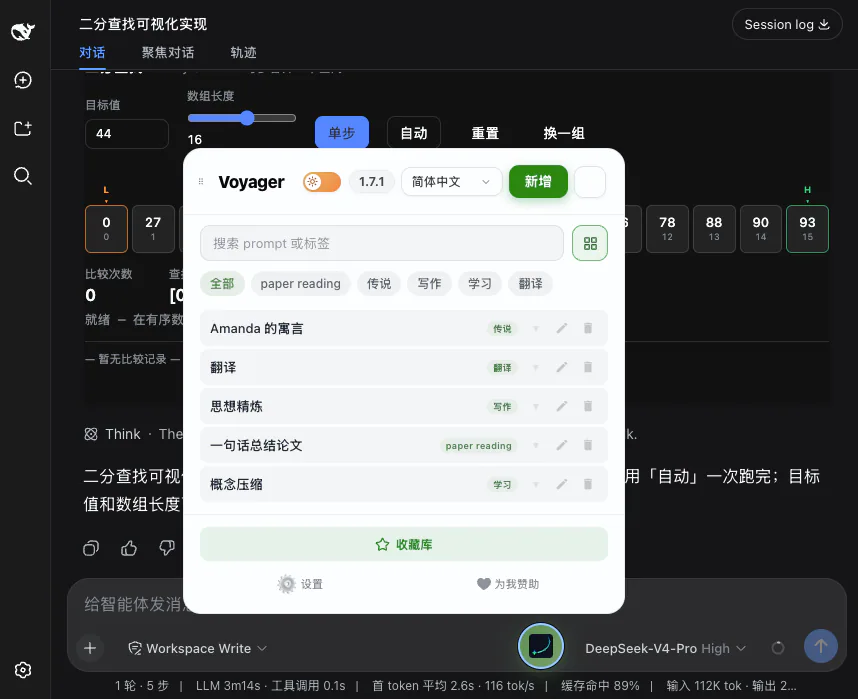
Voyager prompt manager in DeepSeek Harness.
Schermate del progettoInformazioni sullo Skill
Create or modify Voyager declarative plugins, site adapters and native primitives.
SKILL.md
Autore: voyager-crew · voyager-crew/voyager · Nessuna licenza indicata · SKILL.md @ 777f1f4
---
name: create-voyager-plugin
description: Create or change a Voyager declarative plugin, site adapter, or native primitive.
metadata:
  version: '1.4.0'
---

# Create a Voyager plugin

## Select the path

Read only the matching implementation reference. Paths are relative to `src/features/plugins/`.

| Change                                                 | Reference                                                        | Distribution                                                            |
| ------------------------------------------------------ | ---------------------------------------------------------------- | ----------------------------------------------------------------------- |
| CSS/JSON plugin using DOM ops or an existing primitive | [Declarative plugin](references/declarative.md)                  | `catalog/sites/<site>/plugins/<id>/`; bundled and remote                |
| Site selectors, theme, URL matching or a new site      | [Site adapter](references/site-adapter.md)                       | `catalog/sites/<site>/site.json`; existing-site updates travel remotely |
| Behavior needing events, state or generated DOM        | [Native primitive](references/primitive.md)                      | `verbs/`; packaged executable code, requires an extension release       |
| A native Gemini/AI Studio feature becoming a plugin    | [Official plugin](#convert-a-native-gemini-or-ai-studio-feature) | `builtin/`; packaged only, never in the remote catalog                  |

A new site also requires an extension release: its host is an optional permission the user grants, and the content script is registered dynamically (never a static `content_scripts` or required `host_permissions` entry; see `voyager-contribute`'s [repo-traps.md](../voyager-contribute/references/repo-traps.md)). A primitive needs a declarative plugin that invokes it, so read that reference too when adding the caller.

New features follow `.github/CONTRIBUTING.md`; a new primitive or site requires explicit maintainer approval of the approach. Reuse a direct maintainer instruction in the current task as approval; loading this skill grants none. A selector fix within an existing site's approved scope needs no new feature approval.

For architecture or distribution changes, read `src/features/plugins/README.md` and the distribution decisions in `src/features/plugins/remote/DECISIONS.md`. PR preparation uses `voyager-contribute`; live checks use `verify-in-browser` (Safari loading uses `update-safari-extension`).

## Convert a native Gemini or AI Studio feature

A native feature becomes a packaged official plugin that keeps its old setting as its switch: a fixed-id builtin for feature code, or `catalog/sites/{gemini,aistudio}/plugins/` when pure CSS or a shipped primitive covers it. Follow [Native migration](references/native-migration.md) for the order of work, its tests and checks, and the **Gemini and AI Studio** paragraph of `src/features/plugins/local/README.md` for what local plugins may use there.

## Shared constraints

- For settings controlled by another switch, use the `enabledBy` rule in
  [Declarative plugin](references/declarative.md#settings).
- Every injected class is `gv-` prefixed, and the local import gate rejects an
  `addClass` class that is not. Bundled plugins follow the `plugin:new`
  convention, `gv-plugin-<site>-<segment>`; local plugins use
  `gv-plugin-<name>`. Nothing leaks to the host page unscoped.
- CSS loads nothing, not even from the page's origin: no `@import`, no
  `image-set()` / `image()` / `cross-fade()` / `src()`, `url()` only with a
  `#fragment` or a raster `data:` URI (`image/png`, `jpeg`, `gif`, `webp`,
  `avif`, `bmp`, icon; never `data:image/svg+xml`, in any encoding, since an SVG
  filter resource can load images), and no string that starts with an external URL
  (`--u:"//…"`), in the sheet, a `setStyle` value or a `style` attribute.
  `validateStyleCss` rejects the rest.
- `setAttribute` names are an allowlist: `data-*`, `aria-*`, `title`, `role`,
  `lang`, `dir`, `hidden`, `tabindex`, `draggable`, `spellcheck`, `translate`,
  `style`. Values may not contain an external URL. Use `addClass` for classes.
  `plugin.schema.json` carries the same allowlist as a pattern, and
  `schema.test.ts` keeps the two in step.
- A `{{settingKey}}` token is substituted in the CSS, in `setStyle` values and
  in `setAttribute` values; the rendered result is checked again before it
  reaches the page.
- Prefer a semantic key over a raw selector:
  `{ "kind": "semantic", "key": "userTurn" }`. Raw selectors are for what the
  vocabulary cannot name, and they are the first thing to break on a redesign.
- A plugin's `matches` stays inside its site's `matches` (D18).
  `catalog:build` fails otherwise. Patterns are read as Chrome reads them:
  `*.example.com` needs a subdomain (the apex host is outside it) and `*://`
  means http or https only; the build and the runtime agree, so a pattern that
  passes the build also resolves a site.
- `conversationIdPattern`, in `site.json` or as a `turnNavigator` param, is a
  plain anchored capture such as `^/c/([^/?#]+)`: no lookarounds or
  backreferences, no repeated group that holds a quantifier or `|`, at most
  eight quantifiers and 200 characters. It runs on the page's main thread
  against every URL, so the gate (`sites/safeRegex.ts`) refuses anything that
  can backtrack.
- `engine`'s minimum is at least the `sinceEngine` of every primitive the
  plugin invokes. For an unreleased primitive or added optional param, use
  `sinceEngine: 'next'` in its contract/baseline and `"engine": ">=next"` in
  the catalog manifest. A plugin that works only with an unreleased fix to a
  released primitive also declares `">=next"`: merging to `main` publishes the
  catalog before the fix ships, and the `sinceEngine` check cannot see fixes.
  `engine` is the lowest Voyager version the plugin needs; the engine version
  is the extension version (`PLUGIN_ENGINE_VERSION` reads `package.json`).
  Floors in the 1.x range predate that and stay valid. Never write a floor
  above 1.11.0 and at most 2.3.1: Voyager 2.3.1 reports engine 1.11.0, so it
  would refuse the plugin (`engineVersion.test.ts`). `bun run bump` stamps all
  `next` entries with the version it releases. Contributor checks and catalog
  publishing resolve `next` to the default next release (next patch, rolling
  over at 10); published snapshots contain only concrete versions. That
  ordering is the point: an old build then says "update
  Voyager" (`needs-engine`) instead of `needs-handler`, which is left meaning a
  real configuration mistake. `requires.handlers` is optional, since every
  `native` op already counts as a required handler (`pluginStatus.ts`); list a
  primitive there only to require one the plugin does not invoke itself.
  Every matched site must declare the semantic keys a primitive reads,
  including the key a `semanticKey` param names; `plugin:check` also refuses a
  missing required param.
- A plugin runs on desktops and phones unless `requires.formFactors` narrows it.
  Write `["desktop"]` only for a plugin that cannot work on a phone; a phone
  then shows it disabled with `needs-form-factor`. It needs no `engine` floor:
  older builds ignore the key.
- Ten locales for bundled plugins. English lives in the top-level `name` /
  `description`; the other nine sit under `i18n.<locale>` with `name`,
  `description`, `changelog` when set, and a label for every setting. A local
  plugin may omit `i18n` entirely.
- Public catalog plugins get a `README.md` next to the manifest and a
  `marketplace.json` entry (`plugin:new` appends it); `catalog/sites/index.test.ts`
  enforces both. The site's plugin table reads the manifests
  (`docs/.vitepress/pluginsPage.ts`), not `marketplace.json`. Packaged
  Gemini/AI Studio official plugins stay out of `marketplace.json` but appear
  in that table. Fixed-id builtins live in `builtin/` and use the
  manifest/handler binding checks instead.
- `params` is configuration, not instructions (C1 in `remote/DECISIONS.md`): no conditions, no
  ordering, no code. A selector-valued parameter such as `yieldWhen` is still
  data, so do not reject one on its name.
- Themes come from the site, not from guesswork: `site.json`'s `theme` block
  records the host, light and dark selectors. Check both. That block is the
  **only** place a host's own dark-mode dialect is ever named:
  `pages/content/platformTheme/scheme.ts` resolves it once and stamps
  `html[data-gv-scheme='light'|'dark']` plus `html[data-gv-platform='<siteId>']`.
- So scope every light/dark rule — in plugin CSS and in `contentStyle.css` — with
  `html[data-gv-scheme='…']`, never with the host's class (`html.dark`,
  `body.dark-theme`, `:root:not(.dark)`). Get `theme` right and a new site
  inherits every existing Voyager surface with no theme CSS of its own.
  `contentStyleTheme.test.ts` fails on a host dialect that slips back in.
- Accent likewise: `brandColor` in `site.json` (or a plugin's `theme.brand`)
  becomes `--gv-pm-brand`, `--gv-pm-brand-fg` and `--gv-pm-brand-h` on the root.
  Voyager UI that should carry the site's colour reads
  `oklch(L C var(--gv-pm-brand-h, var(--gv-pm-brand-h-default)))`, never a
  literal — a hard-coded hue is how the Vim HUD stayed Gemini green on DeepSeek.
  A rule for one platform only keys off `html[data-gv-platform='<id>']`;
  `gv-platform-themed` means "some brand applies" and three sites share it.
- A creation recolours Voyager's own UI through the public, never-set
  `--gv-theme-*` roles in `src/core/ui/themeVariables.ts`. A new chrome colour
  reads `var(--gv-theme-<role>, <value>)`; the neutral roles (surface, hover,
  text, text-muted, border) only on a Voyager surface or what sits on it, never
  on the page root or on what Voyager draws on the host page. On the host only
  the accent roles, danger and `timeline` (the rail, resting dots and ticks)
  appear.
  `themeVariables.test.ts` keeps the list and the styles in step.
- Never hand-edit `dist_*` or `docs/public/catalog`; `catalog:build` writes the
  published catalog.

## Write your own plugin locally

A declarative plugin for personal use needs no PR, catalog entry or release. Users and their agents start from the public skill, [write-voyager-plugin](https://voyager.nagi.fun/skills/write-voyager-plugin/SKILL.md) (source: `docs/public/skills/write-voyager-plugin/`, SKILL.md plus the site and primitive files it links, generated by `bun run skills:build` from `src/features/plugins/local/authoring/`; regenerate it after changing a primitive, a site's anchors or the local gate), and check offline with `npx create-voyager-plugin check <dir>` (`packages/create-voyager-plugin/`, the same gate bundled). Write `plugin.json` and its `.css` as that skill describes, then in the popup open **Local plugins** (on Claude, ChatGPT, DeepSeek and Kimi it is on the plugin page; on Gemini and AI Studio it is a settings card that by default follows cloud sync and precedes the eight plugin topic cards, `NATIVE_POPUP_SECTION_IDS` in `src/pages/popup/utils/nativeSiteCapabilities.ts`, and users can reorder it) and use **Import files** (manifest plus its `.css` files) or **Paste JSON** (CSS inlined).

- The id is stored as `local.<id>`. Local plugins never replace an official id, are merged last and are outside the remote kill switch.
- The gate is the remote catalog's (`validateManifest`, CSS and rendered-sink guards) plus: `tier: "declarative"` only; every `addClass` class is one `gv-` name; semantic keys (targets, `requires.semantic`, what a primitive reads and what its `semanticKey` params name) must be declared by every matched site; settings are `boolean`, `number` or `select` (the popup has no string or color control); `native` ops only for shipped primitives, with params that fit `verbs/contracts.ts` and `engine` at or above their `sinceEngine`; and `matches` inside an existing plugin platform (Claude, ChatGPT, DeepSeek, Kimi) or a native surface (Gemini, AI Studio). No plugin-supplied JS, ever.
- Gemini and AI Studio take the packaged official plugins (`catalog/sites/{gemini,aistudio}/`, never published to the online catalog) and local plugins. Semantic keys resolve through the native adapters (the keys each packaged `catalog/sites/{gemini,aistudio}/site.json` declares); `theme` is rejected there because those pages keep Voyager's accent. A `native` op passes only for a public primitive explicitly listed in a plugin-owned entry’s `handlers` (`sites/featureOwners.ts`), checked per target site by `sites/hostPolicy.ts`. A fixed-id builtin can own a feature without opening any public primitive: Quote, Highlight, prevent auto-scroll, completion notifications use this path. The fixed Gemini timeline also opens `turnNavigator` for local consumer-Gemini plugins with literal `params: { "dataBackend": "shared" }` and engine >=1.9.0. It shares native stars, levels and collapse state, and refuses turn/route/account identity overrides, Business, Enterprise and custom coverage. Turn off **Show Timeline** before enabling the local replacement; turn the local plugin off before returning to the official rail. Both claim one `timeline-rail` resource, with cold-page official priority and an incumbent holder until disabled. Watermark removal is two such builtins, `voyager.gemini-watermark-download` and `voyager.gemini-watermark-preview`, with no public primitive. No permission prompt: the manifest already injects these hosts. Every supported site, including Gemini Enterprise and AI Studio, receives its own page-locator fixes through the shared online catalog setting. Gemini and AI Studio official plugin manifests, identity rules and CSS stay packaged. Example that tightens your own turns on Gemini:

  ```json
  {
    "id": "me.gemini-compact-turns",
    "name": "Compact Gemini turns",
    "version": "1.0.0",
    "description": "Tighter spacing between my messages",
    "author": "me",
    "category": "readability",
    "license": "MIT",
    "engine": ">=1.0.0",
    "tier": "declarative",
    "matches": ["https://gemini.google.com/*"],
    "contributes": {
      "styles": [{ "css": ".gv-plugin-compact-turn{margin-block:4px!important}" }],
      "domOps": [
        {
          "op": "addClass",
          "target": { "kind": "semantic", "key": "userTurn" },
          "className": "gv-plugin-compact-turn"
        }
      ]
    }
  }
  ```

- A rejected import lists `path: message` and keeps the installed version. An accepted import lands disabled with an inspect view of its sites, CSS size, page changes, primitives and settings; enable it from the plugin list. To update, edit and re-import: the new version also lands disabled, so re-inspect and turn it back on. A plugin with a `native` op that was running keeps its mounted version until the page reloads (D7).
- Export downloads the manifest with CSS inlined; that file is also the starting point for an official contribution, after renaming the id out of `local.` and moving it into `catalog/sites/<site>/plugins/<id>/`.
- Manifests stay on the device (no Drive backup yet); export to keep a copy.

Implementation: `src/features/plugins/local/` and `src/features/plugins/local/README.md`.

## Verification and completion

Use the selected path's validators and focused tests during implementation. Before a code PR, run the final-tree checks in `AGENTS.md`; reuse covered results for unchanged inputs. Run `catalog:build` for catalog/contract changes and inspect its generated diff. Keep the evidence tied to the final changed files; later relevant edits invalidate it.

The PR needs:

- A screenshot or recording on a real conversation in both light and dark themes. Record the site and approximate conversation length; redact conversation/account details from shared evidence.
- The submitted directory's `plugin:check` output and the target selector match count, measured in the page (for example `document.querySelectorAll('<selector>').length`). For pure CSS without countable targets, use visible before/after evidence.
- For a primitive, passing contract tests and parametric tests against two sites' fixtures.

Confirm the intended extension/catalog version is loaded before collecting evidence. A plugin target count of zero while the adapter's `userTurn` matches is the `no-effect` failure (`runtime/healthMonitor.ts`, design D12); investigate missing selectors. Pure-CSS plugins are not tracked by this counter.

Complete when the selected path's requirements pass and a reviewer can see the real behavior in both themes. Apply the affected-browser requirements in [browser-testing.md](../voyager-contribute/references/browser-testing.md) when preparing a contribution. If coverage is unavailable, report the gap and owner; it remains pending.
Perché lo abbiamo scelto
A focused Voyager Extension Skills workflow: Create or modify Voyager declarative plugins, site adapters and native primitives.
Prima di usarlo
- Use the full voyager repository and the dependencies documented with this entrypoint. Project-specific commands require its working tree and configured services.
Agenti supportati
Claude CodeCodex CLI