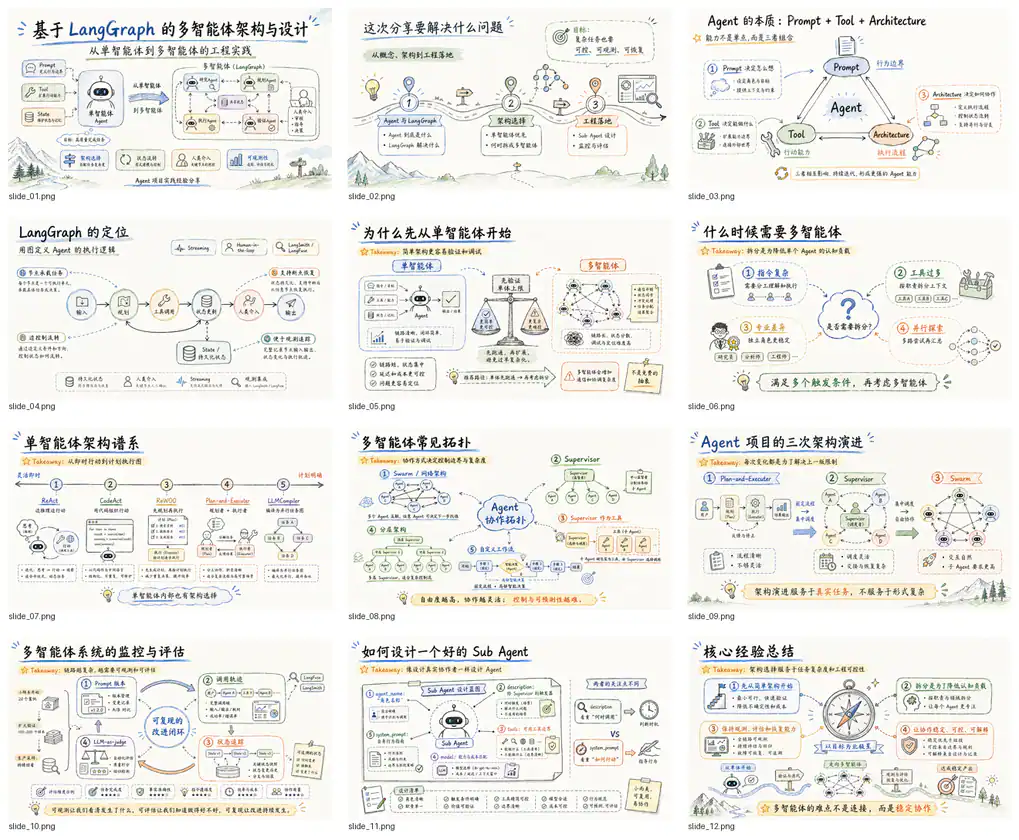
Editorial magazine style presentation preview from the author’s official README.
Project screenshotsAbout this Skill
Guizang PPT Skill is maintained by Guizang (op7418). It turns articles, Markdown and outlines into single-file HTML presentations you open in a browser. Two template systems cover editorial magazine storytelling and Swiss International design. Both include horizontal navigation and local presenter tools, with optional workflows for slide visuals, screenshot framing and social covers.
Why we picked it
A useful choice for talks where visual rhythm and live delivery matter. Choose editorial storytelling or structured Swiss layouts, then supply your article or outline, audience and talk length. The presenter tools travel with the HTML deck. Its main output is a browser presentation; request a different workflow if native PowerPoint editing is required.
What it helps with
- Keynotes, personal talks, private salons, product launches and demo days.
- Turning an article or outline into a visually consistent browser presentation.
- Preparing speaker notes, rehearsing a talk and presenting with a separate audience window.
Two visual systems
Style A: editorial magazine and electronic ink
Serif headings, warm electronic-ink palettes and animated backgrounds suit narrative talks and personal viewpoints. The author provides ten layout types and five theme presets.
Style B: Swiss International
Sans-serif typography, a strict grid, hairline rules and a single saturated accent support product, data and framework presentations. The library provides 22 locked layouts and four accent palettes.
Rehearsal and live presentation
Both templates include a presenter view opened with the bottom-right P control. It shows current and next slides, notes and timers while a separate window displays the audience deck. The runtime works locally in the browser.
Notes and timing
Plan each slide’s purpose, talking points, transition and duration from your outline. Rehearsal stores actual timing locally; auto advance is optional and off by default.
Audience controls
The author documents laser and circle annotations, black or white screens, freeze controls, synchronization status and reconnection after a window closes.
Optional visuals and social covers
The workflow can use available image tools for photos, infographics, process diagrams, comparisons and UI scenes. Match the image ratio to the intended template slot. Screenshot framing can use bundled backgrounds without redrawing the original screenshot.
Related cover formats
The README includes 21:9 WeChat covers, 1:1 share cards, 3:4 Xiaohongshu covers and 16:9 horizontal thumbnails. These are optional outputs derived from the article or deck.
Install the Skill
| Command | What it helps with |
|---|---|
git clone https://github.com/op7418/guizang-ppt-skill.git .claude/skills/guizang-ppt-skill | Claude Code: manual project installation. Skills root: .claude/skills/. Final entry: .claude/skills/guizang-ppt-skill/SKILL.md. |
git clone https://github.com/op7418/guizang-ppt-skill.git .agents/skills/guizang-ppt-skill | Codex CLI: manual project installation. Skills root: .agents/skills/. Final entry: .agents/skills/guizang-ppt-skill/SKILL.md. |
git clone https://github.com/op7418/guizang-ppt-skill.git .cursor/skills/guizang-ppt-skill | Cursor: manual project installation. Skills root: .cursor/skills/. Final entry: .cursor/skills/guizang-ppt-skill/SKILL.md. |
Use the author’s installation command
Run the command in a terminal and choose your agent. Check that the installed guizang-ppt-skill folder contains SKILL.md, assets and references, then open a new agent session.
npx skills add https://github.com/op7418/guizang-ppt-skill --skill guizang-ppt-skill
A useful first request
Use Guizang PPT Skill to turn this article into an eight-slide Swiss-style HTML presentation for our product team. Keep the original figures, add speaker notes and transitions, and plan for a ten-minute talk. Use my supplied screenshots without redrawing their text. Deliver the HTML deck and run the Swiss and presenter validators.
| Command | What it helps with |
|---|---|
node scripts/validate-swiss-deck.mjs path/to/index.html | Run from the installed Skill folder for Swiss layout checks. |
node scripts/validate-presenter-mode.mjs path/to/index.html | Check presenter notes and runtime structure. |
Output scope and license
The primary deliverable is HTML, not a native PowerPoint file. The author does not recommend this workflow for dense tables, information-heavy training or simultaneous multi-user editing. Review font loading, media and audience synchronization in your actual presentation browser.
The root LICENSE is GNU Affero General Public License version 3. This listing links to the original project and preserves its author credit; the repository license governs use and redistribution.
Before you use it
- An agent that can read and write local files and run shell commands. The README identifies Claude Code, Codex and Cursor as supported environments.
- A browser for preview and presentation; allow popups for the separate audience screen. Network access may be needed for external fonts and CDN fallbacks in the templates.
- The Skill is free to install. Your AI agent and optional image generation services have their own costs; visuals require suitable image tools in your environment.
Supported agents
Frequently asked questions
Does this create a PPTX file?
The documented deliverable is a single-file HTML presentation. The repository does not claim a native PPTX export workflow.
Is it free?
The repository is free to install under AGPL-3.0. Your coding agent and any optional image tools may charge separately.
Can I rehearse without a cloud presenter service?
The documented presenter runtime runs locally in the HTML and browser. It provides notes, timers and audience synchronization; check browser popups and external assets before a talk.
Sources & references
Original sources are linked below. Practical starting points are editorial suggestions from SkillHey.