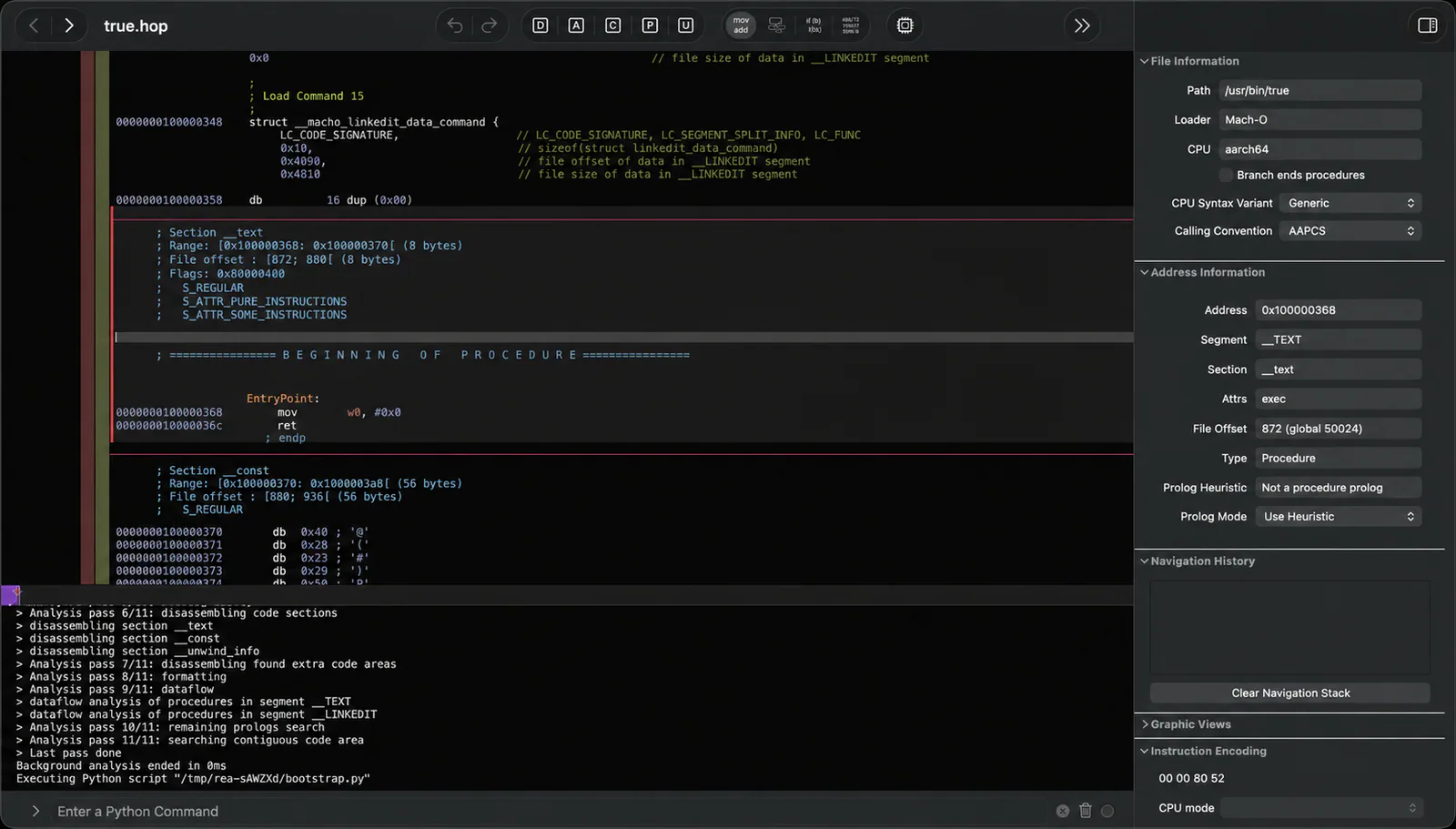
Author’s README screenshot: REA starts its Hopper analysis bridge while inspecting the /usr/bin/true Mach-O binary.
Project screenshotsAbout this Skill
REA combines a standard Agent Skill with a local MCP server and CLI. The Skill helps an agent choose a workflow for the supplied artifact, follow code and runtime evidence, and report what is observed, inferred or still unknown. Its intended targets include shipped applications and binaries; ordinary architecture analysis of a complete source repository can use normal repository tools.
Why we picked it
The reverse-engineer-anything Skill supplies investigation instructions and references. Full workflows use REA tools; installing the Skill alone does not register its MCP server or install analysis engines. This listing reuses the author’s README images and distinguishes tool observations from inferred behavior.
What it helps with
- Developers investigating how a specific feature works in a shipped application.
- Analysts comparing application builds, inspecting packaged resources or tracing binary functions.
- Teams using evidence from their own software to plan a reconstruction or compatibility implementation.
Choose the workflow by target
Native binaries and packages
Inspect functions, strings, symbols, pseudocode and references with a supported provider; package inspection can inventory ZIP, APK, IPA and other artifacts.
JavaScript and Electron
Analyze extracted directories or ASAR files for modules, imports, source maps, routes, preload/IPC boundaries and native add-on relationships.
.NET and Android
Inspect .NET metadata and CIL statically; Android code and resource workflows use their documented external tools.
Websites and runtime behavior
Inspect a supplied browser or Electron target, recorded network captures, or explicitly requested process behavior. Runtime capture interacts with the selected target.
Install instructions, then connect REA tools
The skills CLI installs reverse-engineer-anything and its bundled references. It does not register the MCP service, install an analysis engine or add tools to an already running agent.
For the complete integration, run REA’s setup, select the intended clients, review its changes, then restart the agent. Setup installs matching workflow instructions by default. If tools already work, use them directly; run scoped diagnostics only for a missing connection or provider.
The supported agents shown here are the intersection of SkillHey’s shared catalog and upstream documented setup/manual integration clients. Other MCP-capable clients may use upstream manual registration.
| Command | What it helps with |
|---|---|
npx skills add morluto/rea --skill reverse-engineer-anything | Install only the Agent Skill and references. |
npx rea-agents setup | Configure selected clients with the MCP service and matching Skill; review the proposed changes. |
npx rea-agents@latest doctor --client codex --json | Inspect one Codex registration if the connection is missing; substitute your client ID. |
npx rea-agents@latest setup --client codex --dry-run --json | Preview a scoped connection repair without applying configuration changes. |
Skill entry and workflowInstallation, clients and dependencies
From a question to an evidence-based explanation
| Command | What it helps with |
|---|---|
npx -y rea-agents@latest analyze-javascript-application /absolute/path/to/app --json | Optional direct CLI inspection of an extracted JavaScript/Electron application; does not require MCP or a native analysis engine. |
Supply a specific target and question
Give a local app, binary, ASAR, package or browser target and specify the feature or behavior to understand.
Inspect a useful overview and follow relevant paths
Choose the target-appropriate tool; use a summary first for large artifacts, then follow selected functions, modules, imports or IPC boundaries.
Preserve evidence and unknowns
Keep Evidence IDs and limitations with each finding. Request smaller retained views or an evidence export when a result is too large.
Explain or reconstruct the requested feature
Use the findings to explain behavior or guide a separate implementation and its tests, with observed behavior distinguished from design choices.
Official READMESkill entry and workflowArtifact and JavaScript reconstruction guide
Outputs, release compatibility and limits
Native analysis returns pseudocode and assembly, while JavaScript analysis returns recovered modules and relationships. These are analysis results; exact recovery of the original source code is not guaranteed.
Static inspection reads supplied artifacts without executing the application. Runtime workflows can start or interact with the selected target. REA analyzes locally; model-provider processing of tool results follows your agent service’s terms.
Repository-main instructions may describe capabilities not yet present in an older npm release. Select features using the connected server’s actual tool list and input schemas, and refresh registrations and restart the client when updating.
Use targets you are entitled to inspect. Native format and host support vary by provider; consult the matching upstream guide rather than assuming every workflow is portable.
Official READMESkill entry and workflowInstallation, clients and dependenciesMIT license
Official README images and source review
The gallery reuses the official Hopper screenshot, investigation-flow diagram and case-study artwork from the repository README. They are author-provided visuals, not new results generated or certified by SkillHey.
Sources were reviewed at the pinned repository commit below. The Skill entry and its six reference files are retained for source review. Preview copies are compressed WebP images; original assets and the MIT license are retained separately.
MIT licenseAuthor’s Hopper screenshotAuthor’s investigation-flow diagramAuthor’s case-study artwork
Before you use it
- A local agent with REA MCP tools available, or a shell workflow using the REA CLI. The Skill alone supplies instructions and references.
- Node.js 22.x (22.19+), 24.x (24.11+) or 26+, plus npm. See the upstream setup guide for supported clients and host prerequisites.
- Deep native analysis needs a supported Hopper, Ghidra or IDA installation. Static JavaScript/Electron and .NET inspection do not require a native analysis engine.
- Extra targets have their own dependencies, such as a Chrome-family browser for website inspection, JADX and a JDK for Android code, or Binwalk/Unblob on Linux for firmware.
- REA is MIT-licensed. AI services and separate analysis tools may have their own costs; Hopper and IDA licensing are independent of this Skill.
Supported agents
Frequently asked questions
Is REA a Skill or an MCP tool?
The repository includes both. reverse-engineer-anything is a standard Agent Skill with instructions and references; REA also provides a local MCP server and CLI that perform the analysis.
Does the Skill installation register REA automatically?
No. The skills CLI installs instructions only. Use npx rea-agents setup for selected-client MCP registration and matching instructions, then restart the client.
Do I always need Hopper, Ghidra or IDA?
Deep native analysis uses a supported provider. Static JavaScript/Electron and .NET inspection can work without one. Other targets have their own documented dependencies.
Can it recover the original source code exactly?
No such guarantee is made. Native outputs include pseudocode and assembly; an agent can use these findings to explain or test a reconstruction while retaining evidence and unknowns.
Official sources
Based on official documentation, with practical scenarios suggested by SkillHey.