AI Skills for YouTubers: From Ideas to Video Editing
Last updated: 2026-10-30
Making a YouTube video involves more than recording: creators need an idea, source material, a script, a title and thumbnail, an edit, and a way to learn from the result. An AI agent can assist at each step, but a script suggestion, an editing plan and a rendered video are different outputs.
The eight Skills below are published on SkillHey and organized by task. They include an eleven-part YouTube toolkit, research and caption tools, and video production workflows. This selection follows their documented capabilities; it is not a ranking from a shared performance test.
Last30Days
Research recent discussions across Reddit, X, YouTube, Hacker News, GitHub and other sources.
64.4KStars
Baoyu YouTube Transcript
Extract YouTube captions, timestamps, chapters and cover images into Markdown or SRT.
27.1KStarsYouTube Agent Skill
Eleven YouTube creator workflows for scripts, packaging, editing decisions, Shorts, analytics, planning and channel research.
3.7KStars
MrBeast Perspective
Review YouTube ideas, titles, thumbnails, hooks and pacing through attention and audience-retention methods.
34.6KStarsHiggsfield YouTube Thumbnail
Create YouTube thumbnails and vertical video covers with references and variants through Higgsfield.
1.8KStars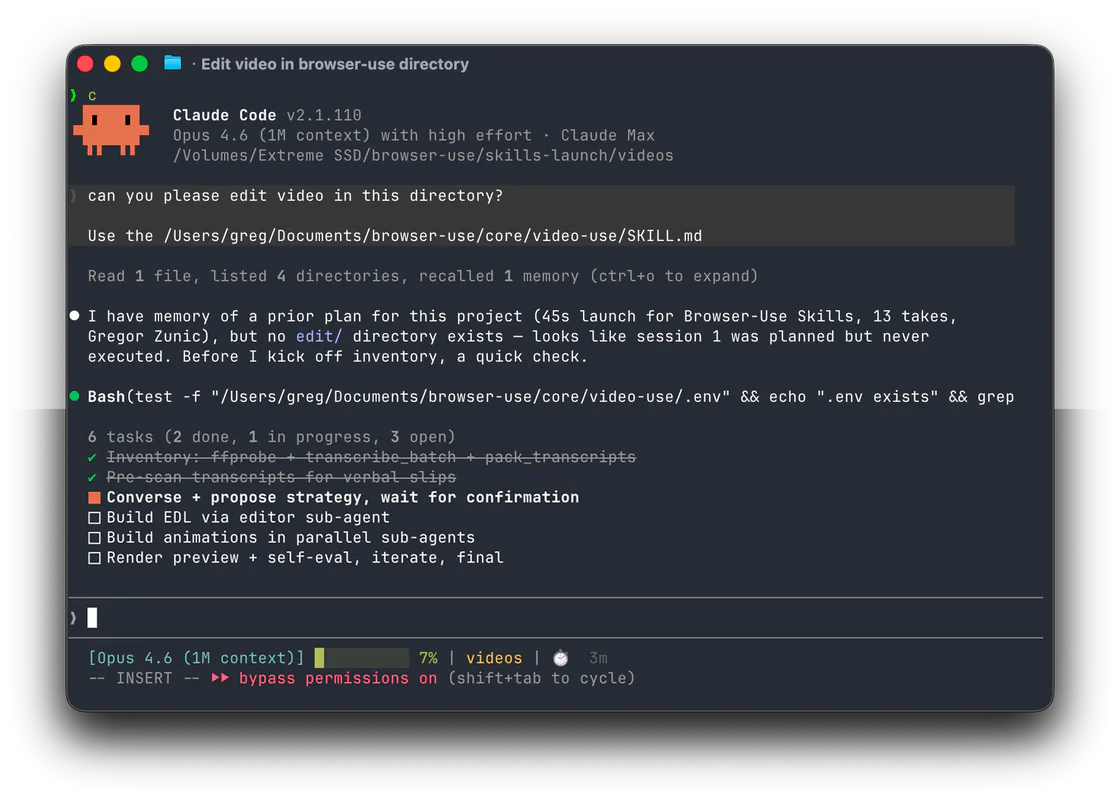
Video Use
Edit any video by conversation.
29KStars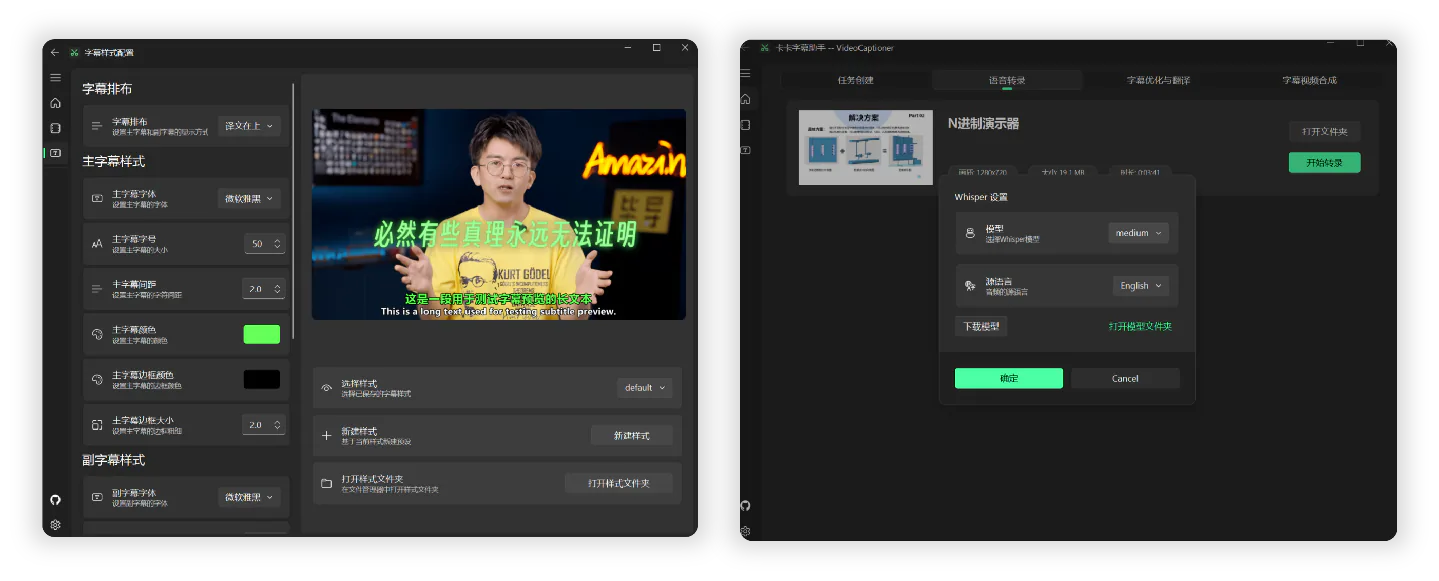
VideoCaptioner
Transcribe, refine, and translate subtitles, then render styled captions into video.
16.3KStars
Simon Whiteboard Video
Create hand-drawn explainer videos with animated strokes, generated stickers, narration, synchronized subtitles, configurable branding and landscape or portrait covers.
429StarsSkills at a glance
| Stage | Skill | What it helps produce |
|---|---|---|
| Find ideas | Last30Days | Recent discussions and source links |
| Research videos | Baoyu YouTube Transcript | Available captions, timestamps and video metadata |
| Plan and improve | YouTube Agent Skill | Scripts, packaging, chapters, Shorts plans and retention analysis |
| Review an idea | MrBeast Perspective | Feedback on a concept, title, hook and pacing |
| Create a thumbnail | Higgsfield YouTube Thumbnail | Generated thumbnail or vertical cover variants |
| Edit footage | Video Use | An edited video from existing recordings |
| Add subtitles | VideoCaptioner | Transcripts, translated subtitles and captioned video |
| Make a drawn explainer | Simon Whiteboard Video | A narrated hand-drawn video with synchronized subtitles |
Find ideas and research: Start with a question
Last30Days collects recent discussions from sources including Reddit, X, YouTube, Hacker News and GitHub. A creator can use it to find questions that recur in a niche, then follow the source links to understand what people are actually asking. Access varies by source and configuration; some routes use accounts or paid APIs.
Baoyu YouTube Transcript retrieves available YouTube captions, timestamps, metadata and cover images, with Markdown and SRT output. It is useful when you need to search a long interview or compare how several videos explain a topic. It uses available captions rather than transcribing every video from audio; automatic captions need checking. During our test, YouTube blocked a transcript request and the optional yt-dlp fallback was unavailable, so access should be verified in your own environment.
For example, a photography creator could search for recent beginner questions about lighting, choose one question that fits the channel, then examine relevant interviews or tutorials. Keep the original links and timestamps, and check claims against the underlying sources before writing.
Plan and write: Turn an idea into a video
YouTube Agent Skill groups eleven workflows for a channel. It can develop a spoken script and hooks, check a title and thumbnail as a pair, plan uploads, draft chapters, analyze a retention export and identify potential Shorts in a transcript. Several workflows include Python tools; the author documents the package for Claude Code.
Give it your audience, the promise of the video, source notes and examples of your own voice. A practical first request:
Write a six-minute script for beginners who want to light an interview at home. Use the supplied notes, offer three opening options and mark where the viewer should see each demonstration. Do not invent equipment prices or test results.
The Shorts workflow identifies moments and proposes new openings; it does not itself export a cut video. Likewise, its edit workflow returns a timecoded decision list for a person or another editor to apply. Hook scores are heuristics, not predictions, and the package does not publish videos.
MrBeast Perspective offers a separate review of ideas, titles, thumbnails, hooks and pacing. Give it a draft and ask where the promise is unclear or the opening takes too long to reach the point. It is a documented perspective, not a prediction of views or an endorsement by MrBeast. Keep the complete example folder and its referenced files when installing.
Make the title and thumbnail work together
Start with the title and thumbnail pairing in YouTube Agent Skill: decide what the title says and what the image adds. Avoid asking both to repeat the same phrase, and make sure the video can deliver the promise.
Higgsfield YouTube Thumbnail then develops a visual concept and generates thumbnail or vertical-cover variants through the Higgsfield CLI. It supports face and logo references and focused edits. A useful brief names the subject, the actual video outcome, the people or assets that may appear, the aspect ratio and any text to include.
The workflow needs an authenticated Higgsfield account and generation credits; reference images may be uploaded to the service. Review the result for accurate faces, readable text and claims the video can support. We inspected the Skill and its requirements but did not run a paid image generation.
Edit and caption: Work from the recording
Video Use edits existing footage through a conversational agent workflow. It is a candidate for a recorded tutorial, interview or talking-head video. Supply the original files, desired duration and moments that must remain, then ask for a preview and an editable record of the changes. It requires a shell-capable agent and the upstream media toolchain.
VideoCaptioner can transcribe speech, refine or translate subtitles and render styled captions into video. Its available transcription and translation routes have different setup requirements; LLM-based refinement and translation require a configured API key. Compare names, technical terms and timings with the audio before using the subtitles.
For an interview, ask the editor to remove pauses while preserving the speaker's meaning and source timecodes. After captioning, watch the result with sound and check the joins, subtitle timing and on-screen placement.
Explain without appearing on camera
Simon Whiteboard Video turns a researched narration into a hand-drawn explainer with animated strokes, voice and synchronized subtitles. It is useful when a diagram can reveal a process one step at a time, such as how a camera sensor captures light.
This is a production workflow rather than a quick caption tool. It needs a local coding agent, the shared video-common module, a configured Volcano Engine TTS account, Node.js, FFmpeg and Playwright Chromium. Supply checked narration, approve a scene plan and review representative frames before rendering the complete video. Keep the editable scene files for corrections.
After publishing: Use your own audience data
The YouTube Agent collection includes Audience Retention Analysis. Provide a YouTube Studio retention export and, when available, a timestamped transcript. The workflow can identify drops and connect them to what was being said; the creator still needs to interpret why viewers left.
Compare the results with the original video and change one concrete part of the next production, such as bringing the demonstration forward. For broader video-making workflows, see the video Skills guide.