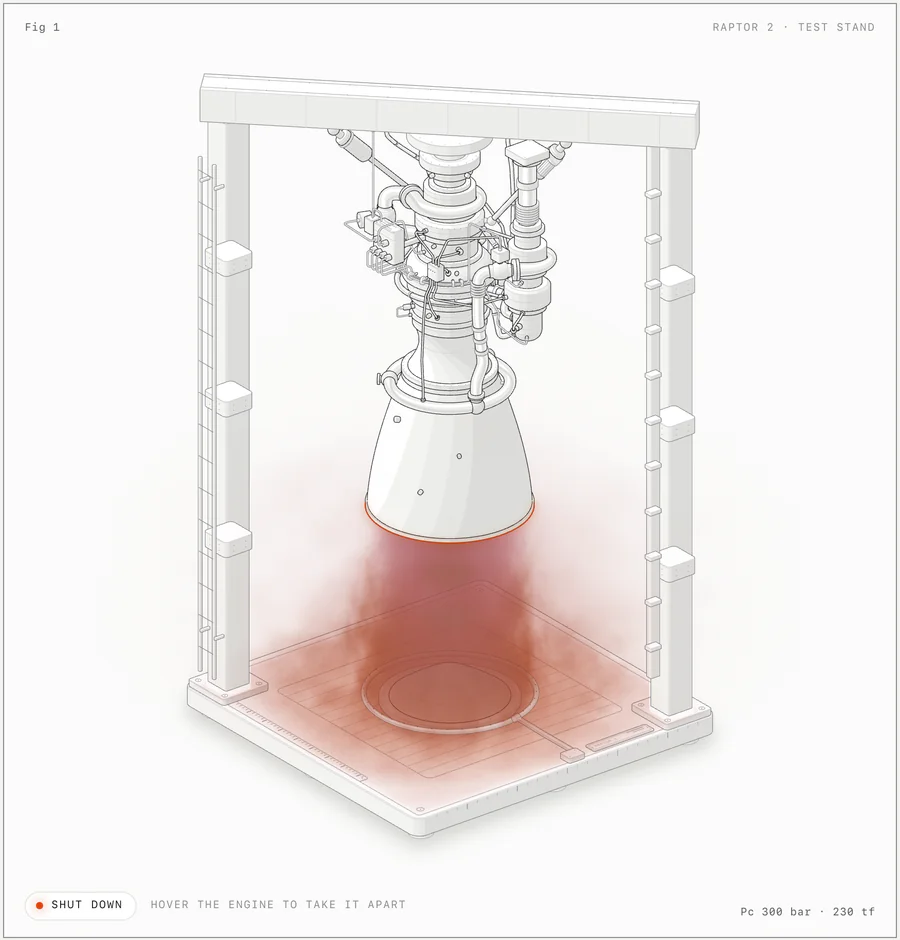
Official Anatomy example: a Raptor engine in its SVG test stand, with a WebGL exhaust plume.
Project screenshotsAbout this Skill
Anatomy is Ryan's MIT-licensed Agent Skill for explaining a technical idea through a physical mechanism. A cache key can become a lock; a shared resource can become a machine serving several stations. The agent builds solid isometric parts, frames the illustration with a title and live readout, and connects motion to the underlying model. The repository includes a drawing kit, example source and browser verification scripts.
Why we picked it
A useful approach for explaining how a system behaves: map a concept to a recognizable mechanism, then connect its movement and readout to the same model. Start with one interaction and real parameters. The cover is a compressed 10-second excerpt of the author's introduction; the gallery reuses official repository screenshots.
What it helps with
- Technical writers explaining algorithms, infrastructure or system behavior in documentation and articles.
- Frontend developers adding an interactive explanatory figure to a product page or React application.
- Educators demonstrating a mechanism with meaningful movement and model-driven numbers.
Choose SVG, WebGL or 3D output
Detailed SVG mechanisms
Build shaded solid parts, mechanical detail and pointer/keyboard interactions. Deliver a standalone HTML page, an SVG with embedded styles, or React/Next.js components.
WebGL inside the illustration
Use shaders for exhaust, flames, water, light or steam. Canvas layers share the illustration's camera so the effects sit among SVG parts; the SVG remains readable without WebGL.
Optional 3D motion, currently beta
Reproject and shade turning or articulated parts as they move. The upstream turning-dial example demonstrates this mode; dense scenes require separate performance review.
Install and invoke the Skill
The repository is the Skill folder: keep SKILL.md, kit, references and required scripts together. The project installer lets you select agents; global installation uses -g and an explicit agent identifier.
Claude Code and OpenCode use /anatomy; Codex uses $anatomy. If the Skill is absent from the client list, follow the upstream reload/restart instructions. The CLI's agent IDs differ from SkillHey labels: Codex uses codex and Antigravity uses antigravity.
| Command | What it helps with |
|---|---|
npx skills add wheresryan22/anatomy | Install into the current project and select agents. |
npx skills add wheresryan22/anatomy -g -a claude-code | Install globally for Claude Code. |
npx skills add wheresryan22/anatomy -g -a codex | Install globally for Codex. |
npx skills add wheresryan22/anatomy -g -a opencode | Install globally for OpenCode. |
npx skills add wheresryan22/anatomy -g -a antigravity | Install globally for Antigravity. |
Give the agent a concept and its real behavior
| Command | What it helps with |
|---|---|
/anatomy explain a token bucket rate limiter as an interactive mechanism, standalone HTML, light theme | A starting brief for Claude Code or OpenCode; supply your actual capacity and refill rate. |
$anatomy explain a pool of 10 database connections, with borrowing, release and a waiting queue, as a React component | A starting brief for Codex; specify the intended request/queue behavior. |
State the concept and parameters
Supply counts, rates, thresholds or dimensions and say which interaction should demonstrate them.
Choose the delivery format and theme
Specify HTML, SVG or React components and a light or dark theme. Let the agent design a recognizable mechanism that represents the concept.
Connect the drawing to one model
The mechanism's positions and displayed values should come from the same model. Review the mapping before adding more parts or effects.
Review the actual output
Inspect desktop/mobile views, pointer and keyboard behavior, reduced motion and the WebGL fallback. Use geometry and line checks where the figure requires them.
Examples, verification and limits
The gallery uses author-provided examples: a Raptor engine, its separated assemblies, a ripple tank, a turning dial and a dial gauge. The cover excerpt is from the author's X introduction and shows additional demonstration scenes. These are upstream visuals, not newly generated SkillHey results.
Anatomy focuses on mechanisms and technical explanations rather than statistical charts, portraits or exact maps. Its 3D mode is beta, and detailed geometry/audits can take substantial time. A new output needs its own visual and performance review.
The repository provides browser capture and geometry-audit tools. A gallery screenshot does not establish that every possible generated mechanism passes those checks. Use the actual scripts for the output you build, and read the resulting images.
Official Anatomy READMEOfficial example source and HTML pagesAuthor's introduction video on XMIT license and attribution
Before you use it
- An agent that loads the repository's SKILL.md and can read and write local files. The author documents Claude Code, Codex, OpenCode and Antigravity.
- Node.js 20.10+ for the built-in drawing kit and build/check scripts. The optional skills CLI installer has its own Node requirement; upstream currently recommends 22.20 or later for that installer.
- Chrome or Chromium for screenshots and browser checks; use CHROME_PATH for a nonstandard installation. React 18+ is needed only for React output.
- WebGL is needed for shader effects. The drawing kit requires no API keys or dependency installation; your agent/model service may have its own costs.
Supported agents
Frequently asked questions
Is Anatomy free?
The repository is open source under the MIT license. Your AI coding agent or model provider may charge separately.
Do I need React or WebGL?
No. The core can produce framework-free SVG and HTML. React is optional for components; WebGL is required only for shader effects.
What if browser checks are blocked?
The author documents Chrome setup and scoped command approval for sandboxed agents. Resolve the specific browser permission or run the check in your terminal; the generated figure can still be reviewed separately.
Official sources
Based on official documentation, with practical scenarios suggested by SkillHey.