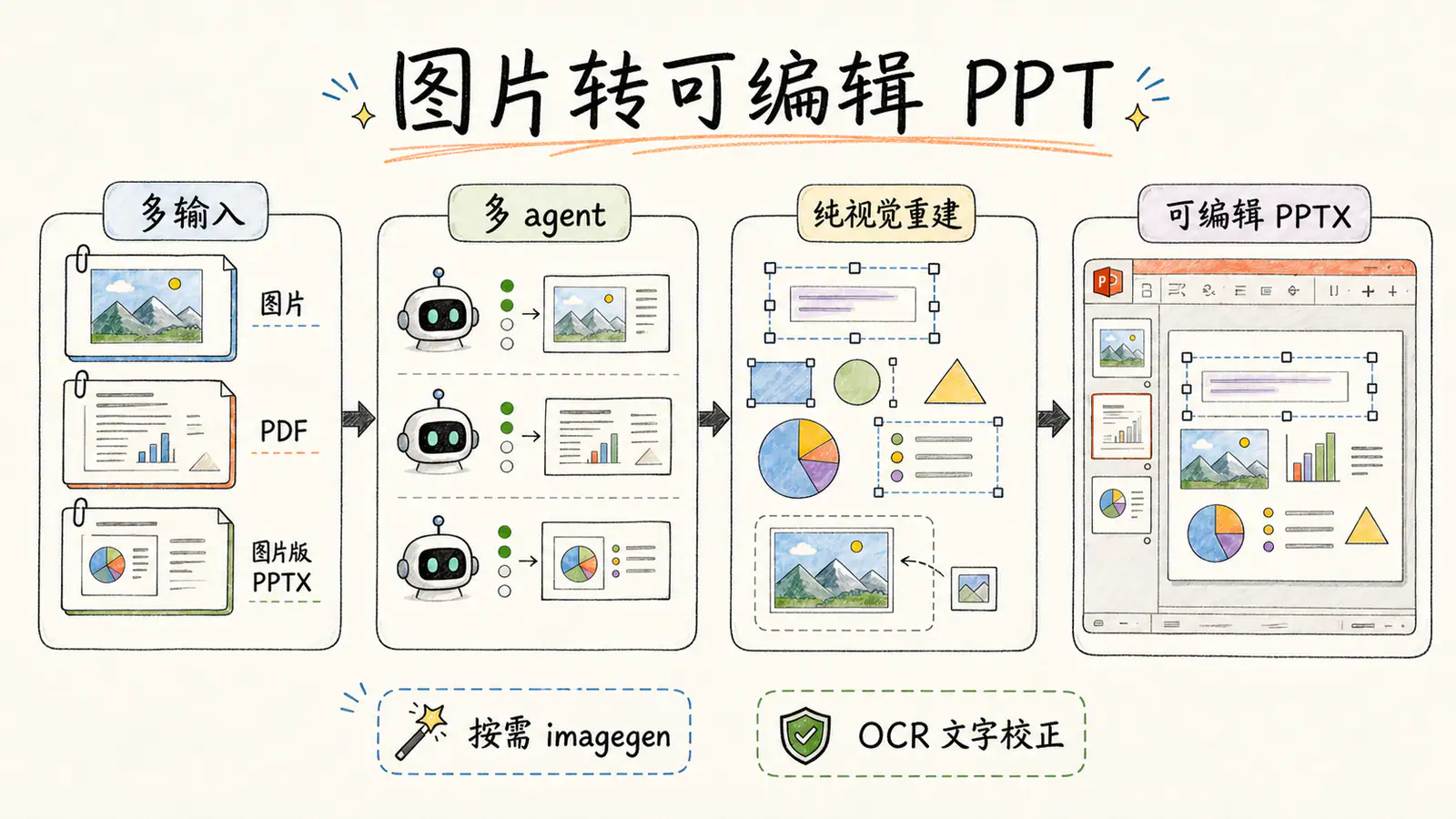
Upstream hand-drawn overview of images, PDFs and image-based slides becoming editable PPTX through page agents, image tools and OCR.
Project screenshotsAbout this Skill
Image to Editable PPT is an MIT-licensed Agent Skill for reconstructing existing slide visuals. Its editppt Python runtime normalizes input pages, measures text, builds each page from an object manifest and assembles a validated .pptx. Text, simple shapes and ordinary tables can be editable; photographs and complex artwork are retained as separate image assets. A single page can run locally in the main Agent, while multiple pages require page workers.
Why we picked it
Useful when you have the slide visuals but need to change the text or layout. Complex illustrations remain separate images; reconstruction quality, runtime and image-service costs depend on the source pages.
What it helps with
- Edit the text and layout of a slide that only exists as a screenshot or generated image.
- Convert ordered images or a scanned PDF into a multi-slide PowerPoint deck.
- Rebuild an image-based PPTX and preserve its speaker notes page by page.
How reconstruction works
Prepare the input
Normalize images, PDF pages or image-based PPTX slides into a separate run directory. Extract speaker notes where present and create text-position hints.
Rebuild page objects
Claim a single page locally or dispatch page workers for a deck. Follow measured coordinates, build editable text and shapes, and separate complex visuals into image assets.
Validate and assemble
Check each page against its manifest, then rebuild the final deck in source order. Verify page count, assets, text coverage and speaker-note mapping.
What you receive
A final .pptx plus a task directory containing page manifests, preview images, validation reports and a run summary. Editable objects are reconstructed from those manifests; placing editable text over a full-slide source image is explicitly rejected by the workflow.
Install and request a conversion
Install the whole image-to-editable-ppt directory and open a new Agent session. On first use, the Agent checks editppt and configures optional OCR or image API access when needed. Choose a host that has the file, shell, image and worker capabilities required by your input.
Convert one image in Codex
Attach the image or provide its local path.
$image-to-editable-ppt Convert this slide image into an editable PowerPoint. Preserve the wording and layout, and report validation results.Convert a deck
Use a worker-capable Agent for multiple pages.
$image-to-editable-ppt Convert <path-to-deck.pdf> into an editable PPTX, preserving page order.
Editability and quality boundaries
This workflow reconstructs existing visuals; it does not write a new presentation from an outline. Complex illustrations, photographs and textures generally remain movable image assets rather than editable internal components. Ordinary native tables are supported, with limits such as diagonal headers and images inside cells.
Small offsets or visual differences can remain. The upstream author describes reconstruction as slow and token-intensive; inspect the output against the source when precise text or layout matters. MIT covers the Skill code; model subscriptions, image APIs and OCR services have their own terms and limits.
Before you use it
- Python 3.10+ and the complete Skill folder, including its CLI, prompts and references. The Agent installs the bundled editppt CLI and checks its dependencies.
- An Agent with local file access and shell execution. Multi-page inputs additionally require worker/subagent dispatch; single-page inputs support local execution.
- Complex visual reconstruction uses built-in image generation/editing when available, then Codex OAuth or a configured OpenAI-compatible image API. Availability, subscription quotas and API charges vary by provider.
- PaddleOCR-VL with a Baidu AI Studio token is recommended for recognized text and measured placement. Without it, offline detection measures text geometry but does not recognize content.
Supported agents
Sources & references
Original sources are linked below. Practical starting points are editorial suggestions from SkillHey.