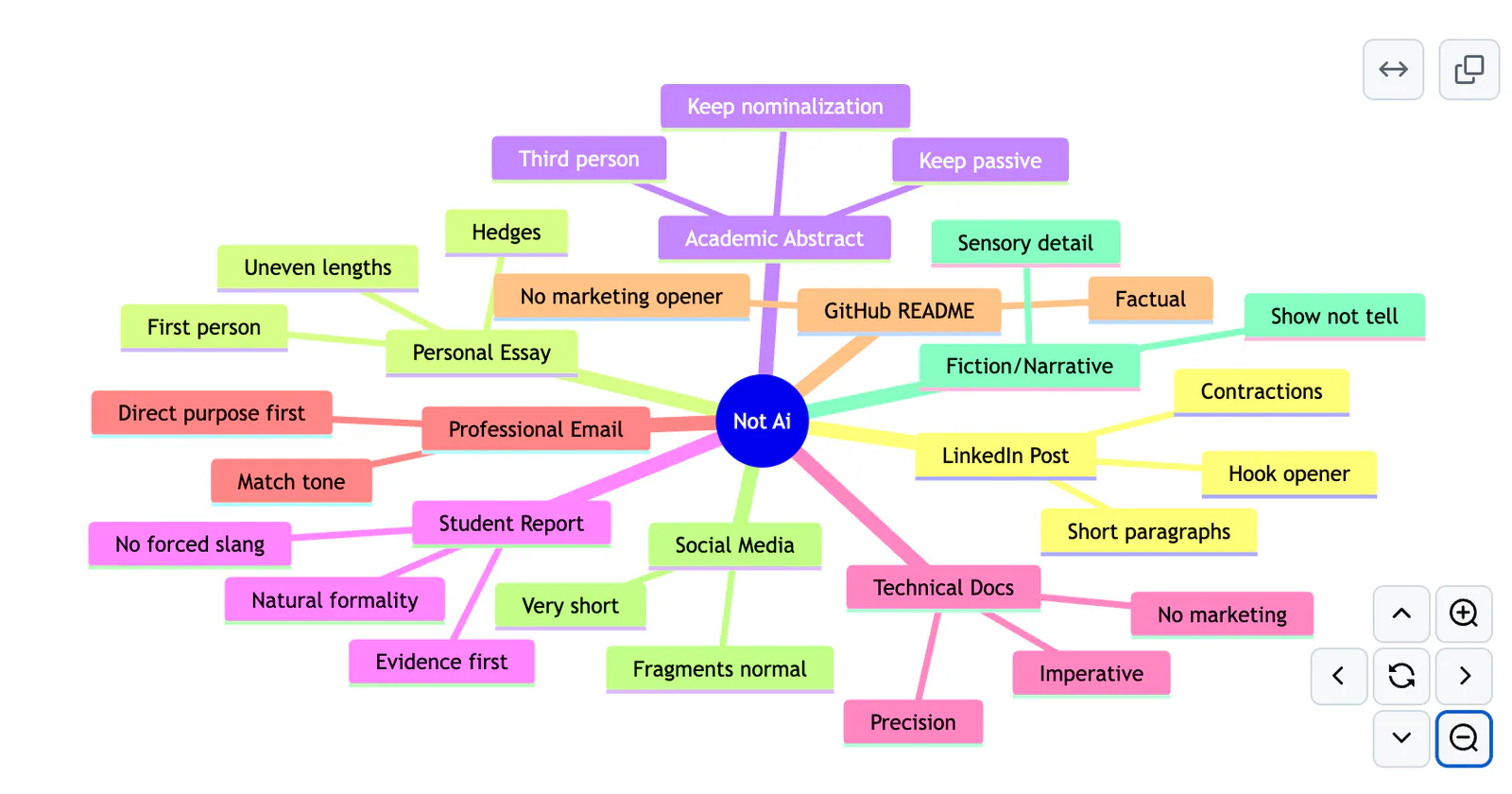
A mind map of Not Ai writing contexts, including academic abstracts, emails, technical documentation, social posts, and essays.
Project screenshotsAbout this Skill
Not Ai is an editorial Skill by Uday Sharma. Give it a passage or notes, the intended audience, and the purpose; it can rewrite, make minimal edits, diagnose issues, draft from supplied facts, or match voice using genuine samples. It protects claims, citations, technical terms, and uncertainty while adapting its approach to the genre.
Why we picked it
An open-source editorial workflow for prose that feels stiff or generic. Its checks are prompts for human review, not proof of authorship or a way to guarantee detector results. The supplied diagram illustrates writing contexts; it is not an output example.
What it helps with
- Revise an email, LinkedIn post, personal essay, or student report for its intended reader.
- Clarify a README or technical document while retaining commands and terminology.
- Diagnose stiff prose without rewriting it, or write from supplied notes without inventing details.
- Use genuine samples to guide an explicitly requested voice match.
Choose an editing mode
Ask for rewrite, preserve, diagnose, from-notes, or voice-match. Supply the text, audience, and goal. The instructions call for protecting facts, names, citations, code, and the author’s position; missing personal details should be requested or marked rather than invented.
For longer documents, the workflow recommends mapping claims and sections, editing section by section, then reviewing consistency across the complete document. Voice matching is optional and uses real samples.
Review findings in context
The Python gate reports mechanical and editorial findings for a selected genre and can check protected literal text. A finding is a prompt to review, not a verdict on quality or authorship. The Skill does not optimize detector scores or promise to prove a text was written by a person.
| Command | What it helps with |
|---|---|
python3 scripts/gate.py draft.txt --genre linkedin | Run the gate from a complete repository checkout. |
Official repository and installation guideCanonical Skill instructions
Installation and supporting tools
The author recommends the skills.sh command and also documents Claude and Codex plugin installation. The canonical Skill lives under plugins/not-ai/skills/not-ai, while the plugin gate and additional scripts live elsewhere in the repository. Check that the files needed for a chosen diagnostic are available; a copy of SKILL.md alone does not include those tools.
Official repository and installation guideCanonical Skill instructions
Before you use it
- An agent that can read Skill instructions; the author documents a skills.sh installer and Claude and Codex plugin options. Model or agent services may charge separately.
- Python 3.10 or newer is needed for the repository’s diagnostic scripts and gate. The gate is dependency-free; other tools and optional integrations have their own requirements.
- The project’s genre profiles and measurements are optimized for English. Non-English stylistic findings need review by a fluent reader.
- The Skill directory and repository tools are separate in the upstream tree. For the documented Python commands, retain the full checkout and run commands from the appropriate repository or plugin root.
Supported agents
Frequently asked questions
Does it guarantee a low AI-detector score?
No. The author explicitly says the workflow does not optimize detector scores or establish authorship. It focuses on clarity, fidelity, and voice.
Can it edit Chinese?
The fidelity and no-invention principles apply across languages, but the author says the genre profiles and measurements are English-optimized. Have a fluent reader review non-English style suggestions.
Sources & references
Original sources are linked below. Practical starting points are editorial suggestions from SkillHey.