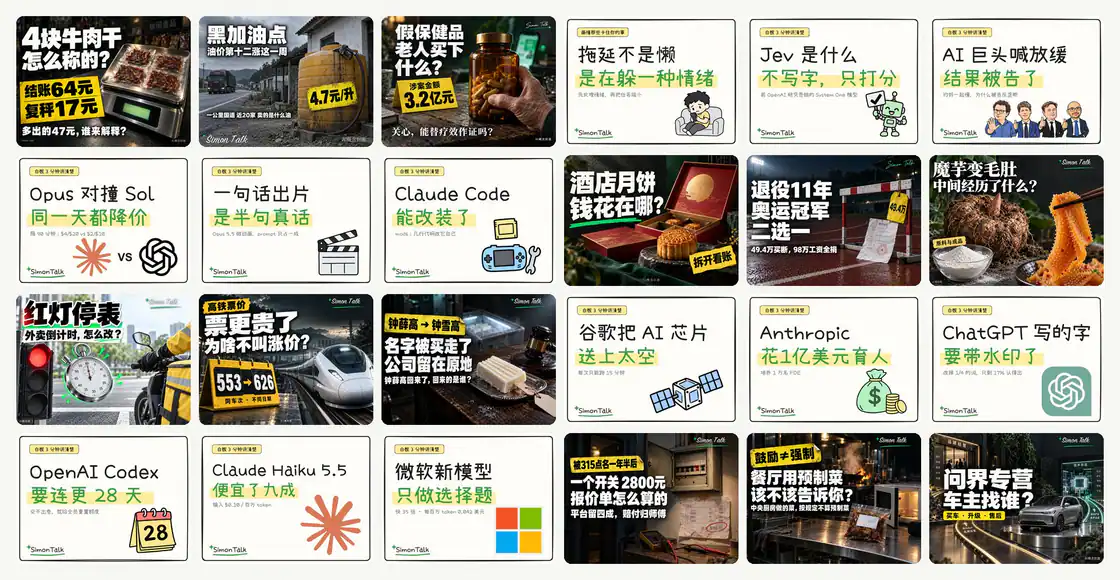
SimonTalk portfolio cover wall with photographic investigation thumbnails and cream hand-drawn whiteboard thumbnails.
Project screenshotsAbout this Skill
investigation-video is the documentary workflow in trustfuture's Simon Skills repository. It organizes a topic into research, a narration script, a footage plan and a Remotion project, then prepares subtitles, covers and distribution copy. The author's default is a landscape investigation of around ten minutes or longer; an explicit user brief determines the actual scope and length.
Why we picked it
The useful connection is between research, the script and the visual timeline. Source records and footage coverage come before the full render, while reusable scripts handle TTS timing, subtitles, audio mixing and delivery checks. It suits creators willing to investigate the subject and review the evidence before publishing.
What it helps with
- Business and consumer reporting that needs a traceable chain of sources and visual evidence.
- Creators producing narration-led videos with footage, evidence cards and explanatory motion graphics.
- Teams maintaining a consistent brand, subtitle style and delivery package across episodes.
Research, script, footage and render
Build the source record before drafting conclusions. The workflow maps footage to narration passages, uses real moving footage as the main visual material and adds evidence cards or motion graphics where they explain the subject. Six narrative modes offer different ways to structure an episode, without treating every video as the same template.
Volcano TTS supplies word timing for subtitle alignment. Remotion composes the timeline, and FFmpeg handles narration normalization and music ducking. Delivery includes the finished video, subtitles, source and usage records, landscape and portrait covers, and copy for the documented platforms. Public posting remains a separate user decision.
Production Skill READMEProduction Skill instructionsShared video-common module
Install the production Skill and its shared module
Clone the repository and run the linking command from its root. Keep the repository in place so the links continue to work. Install video-common beside the production Skill: its ../video-common/ references require sibling directories. The commands below use SkillHey's shared Agent directory catalog.
| Command | What it helps with |
|---|---|
git clone https://github.com/trustfuture/simon-skills.git
cd simon-skills | Download the complete repository and enter its root. |
mkdir -p ~/.claude/skills
for s in investigation-video video-common; do
  ln -sfn "$PWD/skills/$s" ~/.claude/skills/$s
done | Claude Code: install both sibling folders. Final entry: ~/.claude/skills/investigation-video/SKILL.md. |
mkdir -p ~/.agents/skills
for s in investigation-video video-common; do
  ln -sfn "$PWD/skills/$s" ~/.agents/skills/$s
done | Codex CLI: install both sibling folders. Final entry: ~/.agents/skills/investigation-video/SKILL.md. |
Simon Skills repository and installationProduction Skill READMEShared video-common module
Configure an episode project
Put TTS credentials in the production Skill's .env using .env.example. The supplied Remotion template is a minimal environment check. Production scripts are copied into each episode's work/production/ directory because they resolve paths from their own location; the repository README describes the required neighboring files.
| Command | What it helps with |
|---|---|
cd skills/investigation-video/template/remotion
npm install
npm run still | From the cloned repository, check the pinned Remotion template with a still render. |
A useful first request
Use investigation-video to prepare an eight-minute consumer investigation from these sources. Start with the central question and a dated source record, then show the narration outline and footage coverage plan. Use my supplied brand, prepare subtitles and both cover ratios, and deliver the video and publishing copy for review.
Author examples, branding and license
The first gallery image is the requested hero-wall.jpg cover wall. The second retains the author's cover example; the third is the user-supplied screenshot of nine covers for this workflow. Display images are resized to WebP and retain their original branding. New projects can configure their own brand.
Code and documentation use the repository's MIT license. The README separately identifies font and third-party material terms, and reserves the author's published portfolio for display. Keep required license notices and use suitable assets when producing your own episodes.
Simon Skills repository and installationProduction Skill READMEAuthor's hero cover wallRepository MIT license
Before you use it
- A local coding agent with filesystem access and shell execution. The author documents Claude Code and Codex; browser-only chat cannot run this production pipeline.
- Both production Skills require the sibling video-common module and a configured Volcano Engine TTS account. AI services, speech synthesis and supplied media have their own costs and terms.
- Node.js 18+, FFmpeg, yt-dlp and Python 3 with Pillow. The author pins Remotion 4.0.508 and React 19.2.8; follow the repository's versions and font setup.
- Provide the topic, source material, brand and authorized footage or music. The README also names gbro-cover-design and dbskill as separate optional workflow tools for covers, titles and opening diagnosis.
Supported agents
Frequently asked questions
Does it publish the finished video automatically?
The upstream workflow stops at the finished video and publishing package. You review it and choose where and when to publish.
Is video-common optional?
Both production Skills reference its files using sibling paths. Install it beside the production Skill and keep the repository available.
Sources & references
Original sources are linked below. Practical starting points are editorial suggestions from SkillHey.