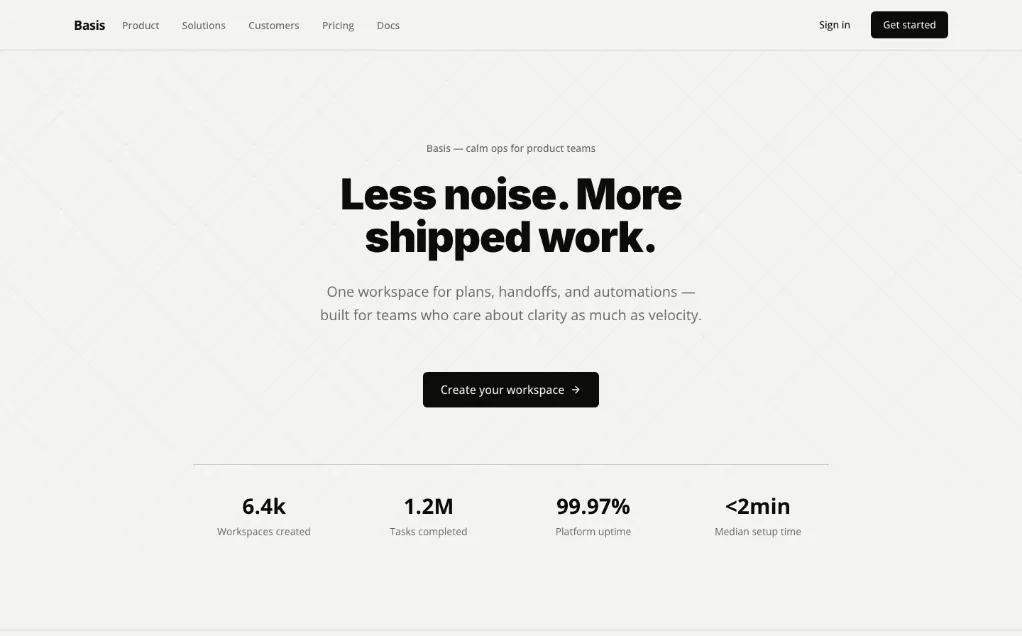
Official Minimal template preview: a light landing page with restrained typography, spacious layout and a single primary action.
Project screenshotsAbout this Skill
Select a style and give your coding assistant its design foundations, component guidance, interaction states and review criteria. The reviewed GitHub index contains 67 templates; each pairs agent-facing SKILL.md instructions with a human-readable DESIGN.md.
Why we picked it
Choose a visual direction, preview the target files, then pull the selected template with the TypeUI CLI. This page keeps the repository together as one catalog item. The gallery contains credited previews from the upstream repository.
What it helps with
- Give a new interface a consistent visual direction.
- Reuse colors, typography, spacing and component states across screens.
- Compare styles such as Minimal, Bento and Glassmorphism before implementation.
Choose a template and load it into your project
The command below uses Minimal as an example. Replace minimal with the desired style slug. The universal output can be used by compatible agents; select your native provider when needed.
| Command | What it helps with |
|---|---|
npx typeui.sh list | Browse available design directions. |
npx typeui.sh pull minimal --format skill --providers universal --dry-run | Preview the universal Skill destination without writing. |
npx typeui.sh pull minimal --format skill --providers codex,cursor,claude-code,open-code | Write the selected template for these explicitly chosen agents. |
npx typeui.sh pull minimal --format design | Pull the companion DESIGN.md for human-readable design guidance. |
Official repository and installation guideReviewed template index
Apply the design rules
Load the selected template
Ask your assistant to read the installed instructions and keep the existing framework and product requirements.
Build a coherent interface
Apply the template’s tokens, typography, spacing and component states.
Check the rendered result
Review responsive layouts, focus, contrast and long or empty states before delivery.
Official example previews
Minimal, Bento and Glassmorphism images come from registry-examples/ at the reviewed commit. They illustrate upstream templates and retain their original example branding.
Before you use it
- Node.js, a package runner and network access are needed for the TypeUI CLI. Model and coding-assistant charges follow the service you use.
- Run the command inside your intended project. Select the output format and provider explicitly for unattended use; inspect --dry-run before writing.
- Use the current CLI provider identifiers, such as codex, cursor, claude-code and open-code. Agent support and final installation roots follow the host you select.
- Design guidance still needs implementation and rendered UI review in your own project. The supplied screenshots are upstream examples.
Supported agents
Sources & references
Original sources are linked below. Practical starting points are editorial suggestions from SkillHey.



