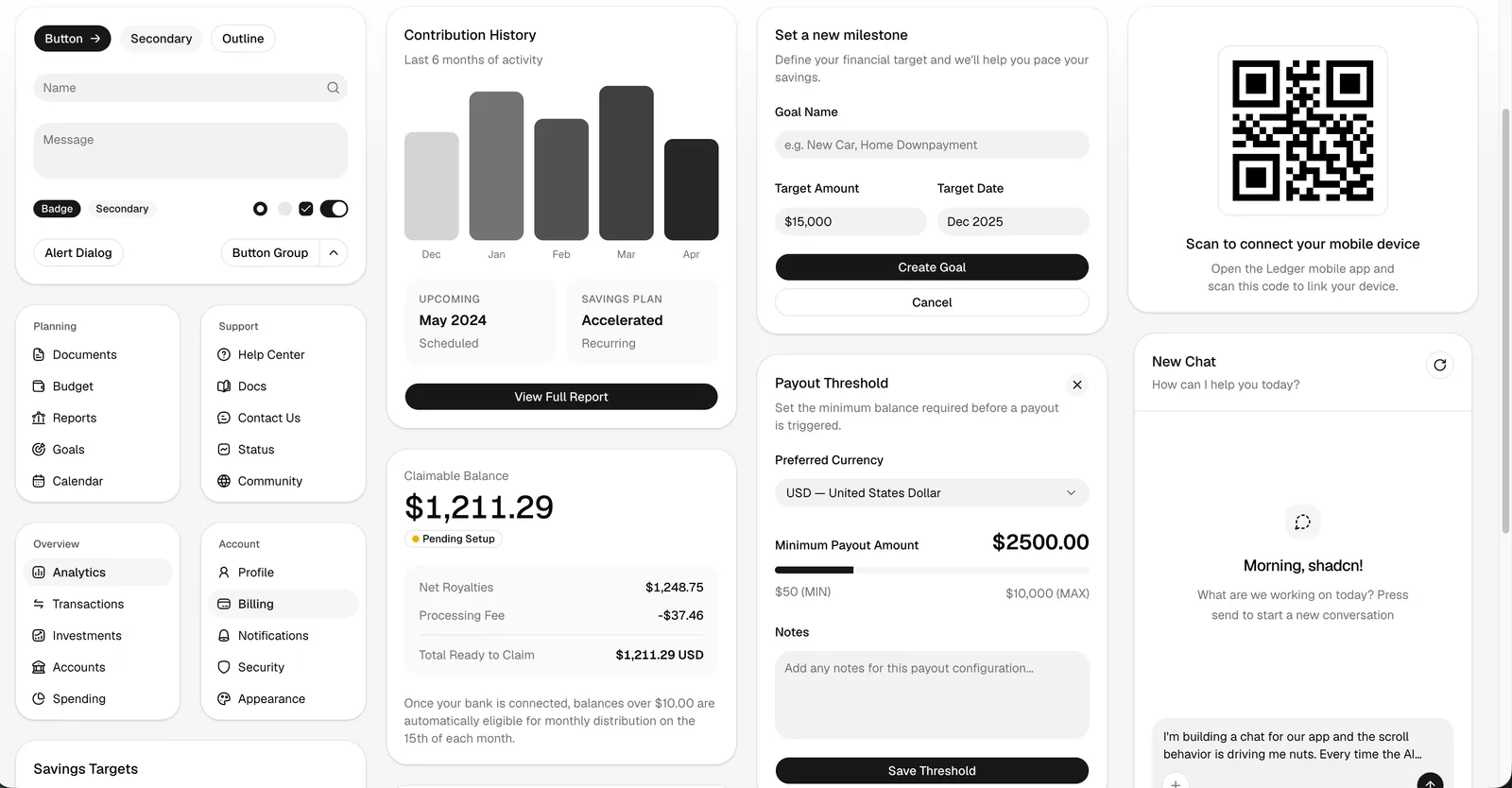
A light shadcn/ui component showcase with forms, navigation, charts, payout settings, and a chat interface.
Project screenshotsAbout this Skill
The official shadcn skill helps an AI coding assistant work with shadcn/ui as editable source code in your project. It uses shadcn info --json to inspect the framework, Tailwind version, aliases, base library, icon library, installed components, and resolved paths. It then guides component discovery, composition, customization, and debugging with current documentation and the CLI.
Why we picked it
Useful for building forms, dashboards, settings pages, chat interfaces, and design systems with shadcn/ui. The skill checks project aliases, installed components, and the base library before choosing APIs. This listing links to the official shadcn skill directory; the gallery uses the supplied component screenshot and the repository’s official preview.
What it helps with
- Build login forms, settings pages, and dashboards from existing shadcn/ui components.
- Debug component composition, imports, base-specific APIs, and styling in an existing project.
- Apply a theme or preset, or build a design system from a DESIGN.md or brand specification.
- Find components and blocks in an explicitly selected registry before writing custom UI.
- Compose chat interfaces with messaging and scrolling primitives documented by the skill.
Start with the actual project
The skill checks configuration before generating code: framework and file conventions, import aliases, installed components, Tailwind version, icon library, and whether the project uses Base UI or Radix. Its rules require component documentation to be fetched before using or fixing a component.
| Command | What it helps with |
|---|---|
npx shadcn@latest info --json | Inspect project configuration and installed components. |
npx shadcn@latest docs button dialog select | Get official documentation and example URLs for these components. |
Official shadcn skill directoryOfficial Skills installation guide
Compose components and keep a consistent theme
Use existing components
Search the requested registry, reuse installed components, and compose forms, navigation, overlays, cards, and feedback using the documented structure.
Follow the project’s APIs
Base UI and Radix use different trigger and composition APIs. The skill directs the assistant to the correct rules for the detected base.
Customize with tokens and variants
Use semantic color tokens and built-in variants; adapt fonts, radius, and component styles through the project’s theme configuration.
Install the requested official skill
Install from the official shadcn-ui/ui repository and select the shadcn entrypoint. The --skill flag scopes this command to skills/shadcn; the repository also contains a separate Radix-to-Base migration skill. Select your coding assistant in the installer. The official guide describes automatic activation when working in a shadcn/ui project.
| Command | What it helps with |
|---|---|
npx skills add shadcn-ui/ui --skill shadcn | Install only the shadcn skill from the official repository. |
npx skills add shadcn-ui/ui --list | Inspect the repository’s available skill entrypoints before installation. |
Official shadcn skill directoryOfficial Skills installation guide
Give the assistant a concrete UI task
A form or settings page
“Create a profile settings page with name and email fields using the components already installed in this project.”
A dashboard
“Build a dashboard with a sidebar, statistics cards, and a data table. Keep our current theme and import aliases.”
A component problem
“Check why this dialog loses focus when it closes. Read the current dialog docs and preserve our customizations.”
Official shadcn skill directoryOfficial Skills installation guide
Preview updates and choose how to apply presets
For an existing customized component, the skill uses CLI dry-run and diff output to compare upstream changes before merging. Preset changes have separate overwrite, partial, merge, and skip workflows. The assistant is instructed to ask which strategy to use before changing an existing preset.
| Command | What it helps with |
|---|---|
npx shadcn@latest add button --dry-run | Inspect affected files before adding or updating a button component. |
npx shadcn@latest add button --diff button.tsx | Compare the upstream button source with the local file. |
Registry authoring and optional MCP
Supporting references cover component registry definitions, dependencies, building and hosting registry content, and MCP server setup. MCP is useful for assistants that need direct registry tools; the skill also documents normal CLI workflows.
Official Skills installation guideRegistry authoring referenceMCP server reference
Before you use it
- Use an Agent Skills-compatible coding assistant with local file access and permission to run project commands. Automatic context injection depends on the host.
- Node.js and a package runner are needed for installation and the shadcn CLI. Use npx, pnpm dlx, or bunx according to the project’s package manager.
- Existing shadcn/ui projects provide components.json for project detection. The skill also documents initialization for a new project.
- Network access is needed to install packages and fetch current registry items and documentation. The optional MCP server is a separate integration.
- The repository is MIT-licensed and the skill is free to install. Model or coding-assistant usage may have its own charges.
Supported agents
Frequently asked questions
Is this the official shadcn skill?
Yes. This listing points to skills/shadcn in the official shadcn-ui/ui repository. Installation fetches the upstream skill and its supporting files.
Does installing the skill add UI components to my app?
Installing the skill adds instructions and references to your assistant. Components are added to your application separately with the shadcn CLI when you ask the assistant to build or update the UI.
Do I need the MCP server?
No. The skill documents normal CLI workflows. MCP is an optional integration for direct registry tools and requires separate host configuration.
Sources & references
Original sources are linked below. Practical starting points are editorial suggestions from SkillHey.