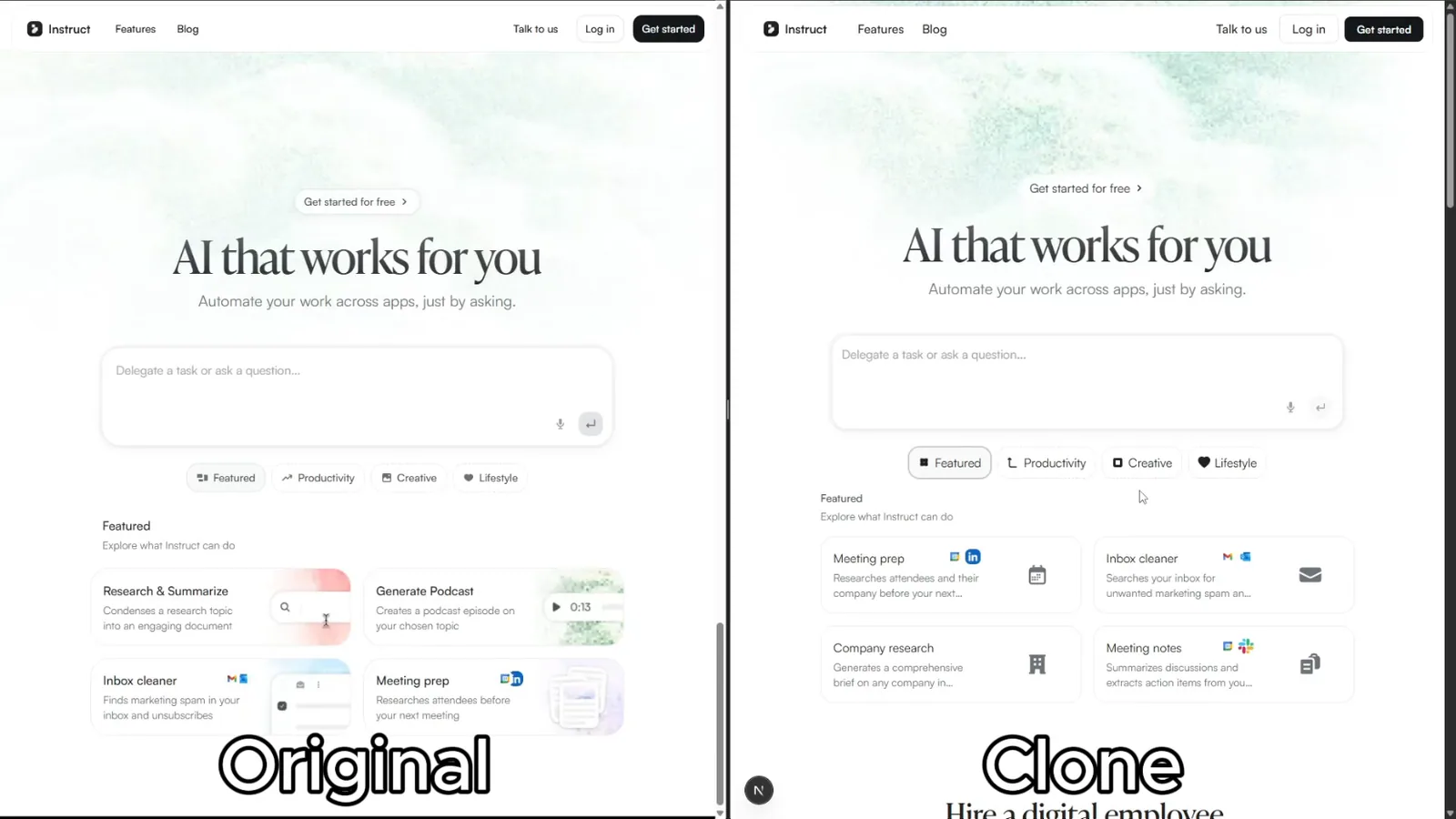
The author's side-by-side comparison of an original Instruct website and its reconstructed clone.
Project screenshotsAbout this Skill
This repository combines a Next.js starter with a portable clone-website Skill. Give a coding agent one or more source URLs; the workflow maps routes, inspects pages and assets across desktop and mobile, builds editable components, and compares the result at matching viewport sizes and interaction states. It includes focused references for inspecting pages and reproducing Framer or animated content.
Why we picked it
A website reconstruction workflow and Next.js starter template from JCodesMore. The cover is the author's comparison image from the repository; results depend on the source, agent and inspection tools.
What it helps with
- Migrate a website you own to an editable Next.js codebase.
- Reconstruct an existing page when its original source is unavailable.
- Study responsive layouts, assets and interaction patterns through a working implementation.
From reference to working pages
The agent maps source URLs to local routes, observes content, assets and interactions, then implements components and compares source and local pages. It returns run instructions, route mappings, representative desktop and mobile comparisons, and remaining differences.
The skill calls for real editable code and working controls; screenshots and iframes serve as references rather than the implementation. Visual similarity and functional completeness still require review.
Official repository and setupClone Website Skill instructions
Set up and run
Clone the repository into a new project, install dependencies with npm install, and run npm run check. Open the project in a supported agent with browser access. In Claude Code or Cursor, the README shows /clone-website followed by the source URL; Codex and OpenCode can use the canonical Skill directly.
| Command | What it helps with |
|---|---|
npm install | Install the template dependencies in the cloned project. |
npm run check | Run lint, type checking and the production build. |
Before you use it
- Node.js 24 or newer, a coding agent with browser access, and network access to the reference site and its assets.
- The author documents Claude Code, Codex CLI, Cursor and OpenCode. The template uses Next.js 16, React 19, TypeScript, Tailwind CSS and shadcn/ui.
- Use material you have permission to reproduce; review the source site's terms and rights to branding, copy and assets.
Supported agents
Sources & references
Original sources are linked below. Practical starting points are editorial suggestions from SkillHey.